

You track keyword rankings by checking where a site lands in Google's results for a given term, at a fixed location and device, then logging that position over time — manually, through Search Console's average position report, or with software that automates the query. The distinction that actually matters isn't which tool looks nicest; it's whether you're renting a subscription that bundles the query cost into a flat monthly fee, or paying the search-data provider directly and owning the software that calls it.
TL;DR:
- A single rank check costs roughly 1.6 cents at the data-provider level — the question is who marks that up and by how much.
- Checking 500 keywords daily runs about $240 a month in raw data cost, which is more than most subscriptions charge, not less.
- A "good" ranking depends on the keyword's click-through curve, not a fixed position; positions 4-10 often convert better than position 1 for commercial terms with heavy ad competition.
- Free checkers are fine for one-off spot checks; they break down the moment you need history, more than a handful of keywords, or page-level diagnostics.
- Self-hosted tracking wins on weekly checks, small keyword sets, and multiple sites or clients; high-frequency daily tracking at volume usually favors a subscription.
Table of Contents
- How to Track Keyword Rankings: Manual Checks, Google Tools, and Automated Trackers
- What Is a Good Keyword Ranking? The Position Numbers That Actually Matter
- Free Rank Checkers vs. Paid Tracking: Where "Free" Runs Out
- Mobile Rankings vs. Desktop Rankings: Why the Same Keyword Shows Two Different Stories
- What a Daily Check Actually Costs: The Math Subscription Pricing Hides
- Best Keyword Tracking Tools and Rank Tracking Software: How to Choose
- Page-Level Diagnostics That Position Numbers Alone Won't Show
- Own Your Rank Tracker Instead of Renting It
- Frequently Asked Questions
- Sources
How to Track Keyword Rankings: Manual Checks, Google Tools, and Automated Trackers
The crudest method is still common: open an incognito browser, search your keyword, and scroll until you find your URL. It works for a single spot check, but it's unreliable the moment you need consistency — Google personalizes results based on location, search history, and device, so your incognito window and your client's browser can show genuinely different rankings for the same query at the same minute.
Google Search Console's Performance report gives you an "average position" number for free, pulled from real impression data rather than a simulated query. It's useful and it's honest, but it isn't the same thing as a rank check: Search Console averages across every impression a query generated, including ones where your page showed up in a carousel, an image pack, or a personalized result you'd never see by searching manually. Google's own Search Console documentation explains this averaging method, which is why the number in Search Console and the number in a dedicated rank tracker frequently disagree by a position or two.
Automated rank-tracking software solves the consistency problem by sending structured queries through a licensed search-data provider — a company that has a commercial relationship with search engines to return results at scale — rather than scraping Google directly. Google's Search Essentials guidelines note that sending automated queries straight to Google's search results violates its Terms of Service, which is the entire reason this data-provider layer exists. DataForSEO Pricing and API Costs, Explained With Real Math breaks down what that layer actually charges per query, which matters more than people assume once you're checking hundreds of keywords.
What Is a Good Keyword Ranking? The Position Numbers That Actually Matter
A good ranking is the one that converts, not the one that looks impressive in a report. Backlinko's organic click-through-rate study found that the average CTR for the first organic position is around 27.6%, dropping sharply by position five and further still past page one — but that curve shifts hard depending on how many ads, featured snippets, and "People Also Ask" boxes sit above the organic results for a given query.
Position 1 captures roughly 27.6% of clicks on average. Position 10 captures a fraction of a percent. Everything in between is where most SEO budgets actually get spent.
For commercial, high-competition keywords with four paid ads stacked above the fold, a position 4 or 5 ranking sometimes gets more real clicks than a technically "better" position 3 buried under ad clutter. This is why tracking position alone, without also tracking click data from Search Console, tells you half the story. If you're still deciding which keywords are worth tracking in the first place, Keyword Research: What Works, What's Free, What to Buy is the place to start before you build a tracking list around terms nobody searches.
A realistic benchmark: for a new page on a competitive commercial term, cracking the top 20 within three months and the top 10 within six is a solid outcome. Anything faster than that on a genuinely competitive keyword is either a low-competition long-tail term in disguise or a fluke that won't hold.
Free Rank Checkers vs. Paid Tracking: Where "Free" Runs Out
Free rank checkers — the kind you plug a URL and keyword into and get a single position back — are genuinely useful for a one-off check. They're built to answer one question once, and they answer it well.
- No history. A free checker tells you today's position. It can't tell you whether you moved up or down last week, which is the actual question most people are trying to answer.
- Hard caps. Most free tiers cap you at a handful of checks per day, which makes them unusable for anything beyond spot-checking a single page.
- No page context. A free checker won't tell you that the page it just ranked for returns a 404, has a noindex tag, or redirects somewhere unexpected — all of which quietly tank rankings without any alert.
- No country or device control. Many free tools default to one location and one device, so you can't see that your mobile ranking in Canada is eight positions behind your desktop ranking in the US.
Pro Tip: before paying for any tracker, check your Search Console data for the keyword first. If Search Console shows zero or near-zero impressions for a term, no rank tracker is going to make that keyword matter — the position number is irrelevant if nobody's search is surfacing it.
Mobile Rankings vs. Desktop Rankings: Why the Same Keyword Shows Two Different Stories

Google has run mobile-first indexing for years, meaning the mobile version of your page is generally what gets crawled and ranked. But the ranking you see still depends on which device the query simulates, because local pack results, layout, and even which pages rank can differ between mobile and desktop search results for the same term.
This matters most for local and transactional queries, where mobile search behavior (and mobile-specific SERP features like click-to-call) changes which result Google decides to surface first. A rank tracker that only checks desktop will miss a mobile ranking drop entirely — and if most of your traffic is mobile, that's the drop that actually costs you money. Tracking both device types for your priority keywords, rather than picking one, is the only way to catch a device-specific ranking problem before it shows up in your traffic numbers.
What a Daily Check Actually Costs: The Math Subscription Pricing Hides

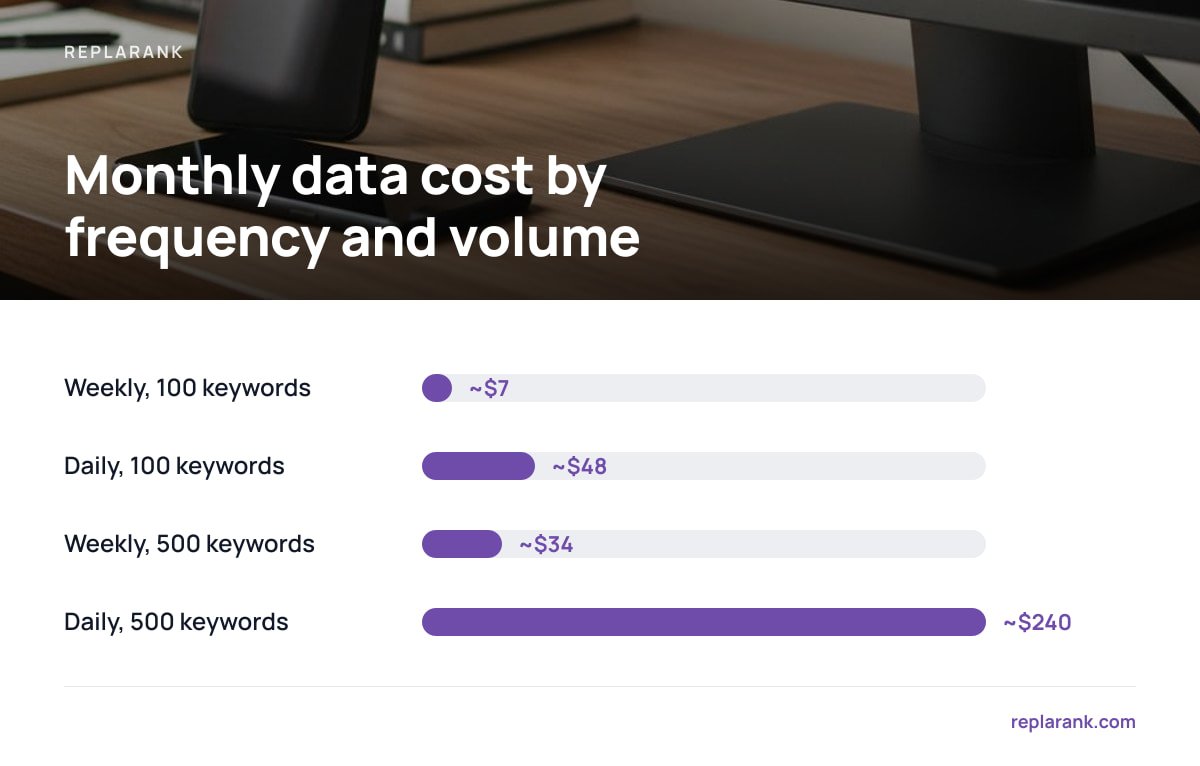
A single fresh rank check, at the data-provider level, costs roughly 1.6 cents. That number sounds trivial until you multiply it by keyword count and checking frequency — at which point it either disappears into nothing or balloons past what a subscription would have charged you.
| Checking frequency | Keywords tracked | Approximate monthly data cost |
|---|---|---|
| Weekly | 100 | ~$7 |
| Daily | 100 | ~$48 |
| Weekly | 500 | ~$34 |
| Daily | 500 | ~$240 |
That last row is the one worth sitting with: checking 500 keywords every single day costs roughly $240 a month in raw data cost alone — more than Wincher's Basic plan at $49 a month, which bundles that query volume into a flat subscription fee. If you're tracking a large keyword set daily, a subscription that absorbs the query cost across thousands of customers is genuinely the cheaper option, and it's worth saying plainly rather than pretending otherwise.
Where the math flips is frequency and volume. Most SEO work doesn't need daily checks — rankings for established pages don't move meaningfully day to day, and weekly or even biweekly checks catch every real trend without the cost of daily noise. At weekly checking and a few hundred keywords, paying for data directly costs a fraction of a flat subscription fee, and you're not paying for keyword slots you aren't using.
Best Keyword Tracking Tools and Rank Tracking Software: How to Choose
There's no single "best" rank tracker — there's a best fit for your checking frequency, keyword volume, and how many sites or clients you manage. Broadly, the market splits into four categories.
The Four Categories of Rank Tracking Software
- Enterprise SEO suites. These bundle rank tracking alongside site audits, backlink analysis, and content tools in one subscription. They're strong if you already use the suite for other work, but you're paying for the whole platform even if rank tracking is all you need.
- Dedicated rank-tracking SaaS. Built around tracking and little else, usually billed by keyword-slot count per month. Good for teams that want reports without managing infrastructure, and genuinely cost-effective at high daily-check volumes.
- Free rank checkers. Fine for spot checks, unusable for ongoing monitoring due to caps and lack of history, as covered above.
- Self-hosted trackers. Software you install and run yourself, paying the underlying search-data provider directly. You own the tool outright and aren't billed per keyword slot, but you're responsible for your own server and setup.
If you manage one site and check rankings weekly, a self-hosted tool amortizes to almost nothing after the first month. If you manage dozens of client accounts needing daily checks across thousands of keywords, the per-keyword-slot subscription model is built for exactly that volume and will likely cost less than running the queries yourself.
Page-Level Diagnostics That Position Numbers Alone Won't Show
A ranking drop is a symptom. The cause is usually something on the page that a position number alone will never reveal: a redirect chain that lost equity, a noindex tag that slipped through a staging deploy, a canonical tag pointing at the wrong URL, or a quiet 404 where a page used to be.
Most rank trackers report position and stop there, which means the actual diagnosis — "why did this fall twelve spots" — happens in a separate audit tool, days or weeks after the drop already happened. A tracker that checks page health (status codes, redirects, noindex, canonical tags) alongside position history on the same schedule catches the cause the same week it happens, not after someone finally runs a full site crawl. This is one of the places where ownership of the tool matters: a self-hosted setup like ReplaRank's can run those page checks on the exact same schedule as the rank check, because it's the same system rather than two separate subscriptions that don't talk to each other.
Own Your Rank Tracker Instead of Renting It
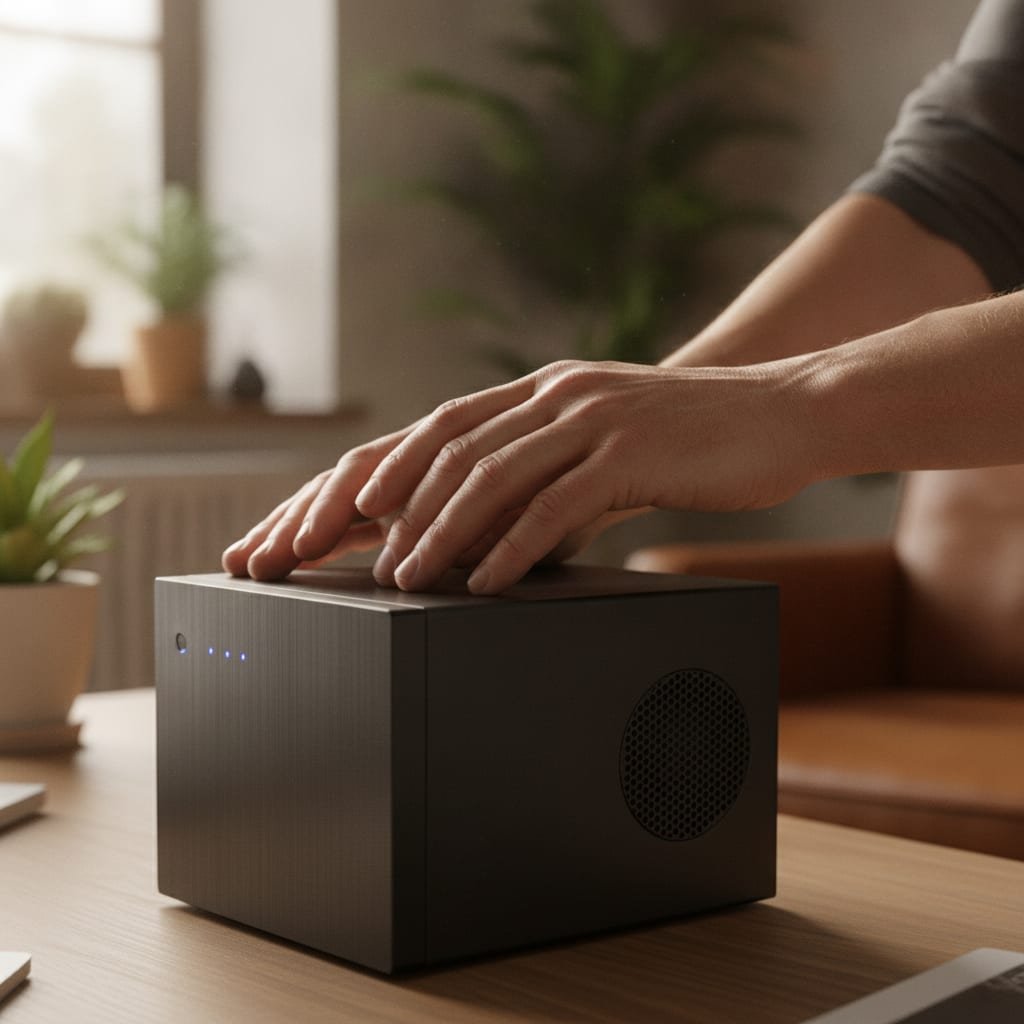
ReplaRank is a self-hosted rank tracker you buy once for $399 and run on your own server, paying DataForSEO directly at cost for the queries instead of paying a markup baked into a monthly plan. It tracks mobile and desktop positions across 35 countries, flags 404s, redirects, noindex tags, and canonical issues alongside position history, and syncs daily with Search Console to keep click data by query and date well past Google's 16-month retention window. It includes unlimited sites and users, isolated brands with their own spend limits, and a 50-tool MCP server for Claude Desktop, Claude Code, and Cursor. The honest caveat: if you're tracking thousands of keywords daily, or you need scheduled email reports and white-labeled client dashboards, check the math and the spec sheet first — a subscription may genuinely serve you better.
Frequently Asked Questions
How do you track keyword rankings?
You check where your page lands in Google's results for a specific keyword, at a fixed location and device, then log that position over time rather than relying on a single snapshot. Most people do this through Search Console's average position data, a dedicated rank-tracking tool that automates the query through a licensed search-data provider, or a self-hosted tracker that does the same thing without a per-keyword subscription fee.
What is a good keyword ranking?
A good ranking is one that produces clicks, not just a low position number — Backlinko's organic CTR research shows position 1 captures roughly 27.6% of clicks on average, but that share shrinks fast on queries crowded with ads or featured snippets. For a new page on a competitive commercial keyword, reaching the top 20 within three months and the top 10 within six months is a realistic, solid benchmark.
What are the best keyword tracking tools?
There's no single best tool — enterprise SEO suites fit teams that already use them for audits and content work, dedicated SaaS trackers fit agencies checking thousands of keywords daily, free checkers fit one-off spot checks, and self-hosted trackers fit anyone checking weekly or biweekly who wants to own the tool outright instead of paying per keyword slot every month.
What is the best rank tracking software?
The best software depends on your checking frequency and keyword volume more than any feature list. At high daily-check volumes across thousands of keywords, a subscription that spreads query costs across many customers is usually cheaper; at weekly checks on a few hundred keywords across one or several sites, a self-hosted tool you pay for once typically costs less over time.
Is there a free way to track keyword rankings?
Free rank checkers exist and work fine for a single spot check, but nearly all of them cap daily checks, discard history, and skip page-level context like redirects or noindex tags. Google Search Console is the one genuinely free, ongoing option, though its average position metric is calculated differently from a simulated rank check and the two numbers won't always match exactly.
Sources
- Organic Click-Through Rate Study | Backlinko
- Search Essentials | Google Search Central
- Performance Report: Average Position | Google Search Console Help
- DataForSEO Pricing | DataForSEO
- Wincher Pricing | Wincher
Recommended
- DataForSEO Pricing and API Costs, Explained With Real Math
- Keyword Research: What Works, What's Free, What to Buy
- Switch Rank Tracker Without Losing Historical Data: A Checklist