

Keyword rankings are the positions your pages hold in search results for specific queries, and the number you see depends on who measures it. Search Console reports an average across every impression, while a rank tracker reports a fresh check from one location and device. For your own site, the free route is Search Console. Paid tracking earns its cost only when you need position data on a schedule you control.
TL;DR:
- Keyword rankings come in three flavors: Search Console's averaged position, a tracker's point-in-time check, and what a real user in a real location sees. They rarely match.
- Free rank checkers are fine for a one-off look. They give you no history, one location, and tight limits, so they fail as a monitoring system.
- At about 1.6 cents per fresh check, 500 keywords checked daily costs roughly $240 a month. A $49 subscription is cheaper at that volume.
- Weekly checks, small keyword sets, many sites, and multiple users are where per-check pricing and a one-time purchase come out ahead.
- A position drop is often a page problem (404, redirect, noindex, canonical), not a ranking problem. Track page health next to position.
Table of Contents
- Keyword Rankings Are Three Different Numbers, Not One
- Free Keyword Rankings Checkers: What You Get and Where They Stop
- The Genuinely Free Stack: Search Console Plus a Spreadsheet
- What Paid Rank Tracking Actually Costs Per Check
- Daily or Weekly: The Cadence Decision That Sets Your Bill
- When a Subscription Is Cheaper, and When Owning the Tool Wins
- Why a Drop in Keyword Rankings Is Often a Page Problem
- Own Your Rank Tracker for $399 and Pay Search Data at Cost
- Frequently Asked Questions
- Sources
Keyword Rankings Are Three Different Numbers, Not One
Most confusion about keyword rankings comes from comparing numbers that measure different things. You will run into three of them.
- Search Console average position. Google's Performance report documentation defines position as an average across impressions, based on the topmost position your site held each time it appeared. A query showing "6.2" may mean you were first for some users and fifteenth for others.
- Tracker position. A rank tracker asks a search engine for results at a specific moment, from a specific country and device, and records where your URL appeared. It is a snapshot, not an average.
- Position for a real user. What your customer sees depends on their location, device, and history. No tool gives you this exactly. You approximate it by fixing location and device and holding them constant.
None of these is wrong. They answer different questions. Search Console tells you what happened, with real clicks attached. A tracker tells you where you stand today for a keyword you chose, including keywords where you have zero impressions so far.
Free Keyword Rankings Checkers: What You Get and Where They Stop
Free checkers, including most of the "website ranking checker" and "keyword ranking checker" pages that rank for this query, do one thing: you type a keyword and a domain, and they return a position. That is useful for a sanity check before a client call.
Here is what they usually lack:
- History. A single number tells you nothing about direction. Without a time series, you cannot tell a dip from a trend.
- Location and device control. Many default to one country and desktop. If your traffic is mostly mobile, you are measuring the wrong surface.
- Volume. Free tiers cap you at a handful of lookups per day or require sign-ups to go further.
- Diagnostics. They report that you dropped. They cannot tell you your page now returns a 404.
My position: use a free checker for spot checks, and do not build a reporting process on one. The moment you ask "what was this keyword doing in March?", a free checker has no answer.
The Genuinely Free Stack: Search Console Plus a Spreadsheet
If you own the site, the best free source of keyword rankings is Search Console. It gives you queries, impressions, clicks, and average position for pages you control. That beats any free checker for accuracy of click data.
The limits are real, though:
- Retention. Search Console keeps 16 months of data. If you want year-over-year comparisons beyond that, you have to export and store it yourself.
- Only queries with impressions. You will never see a keyword you are not yet showing up for.
- Anonymized queries. Google withholds some rare queries from the report, so totals can be incomplete.
Search Console keeps 16 months of performance data. Anything older is gone unless you exported it.
If you stay on the free stack, set a calendar reminder to export by query and date every month. A one-time export is cheap. Reconstructing lost history is impossible.
What Paid Rank Tracking Actually Costs Per Check
Paid trackers sell two different things: the search data (a fresh query to a search engine) and the software around it. Providers such as DataForSEO bill the data per request. That is why self-hosted setups, where you pay the data provider directly, expose the true unit cost: roughly 1.6 cents per fresh check.
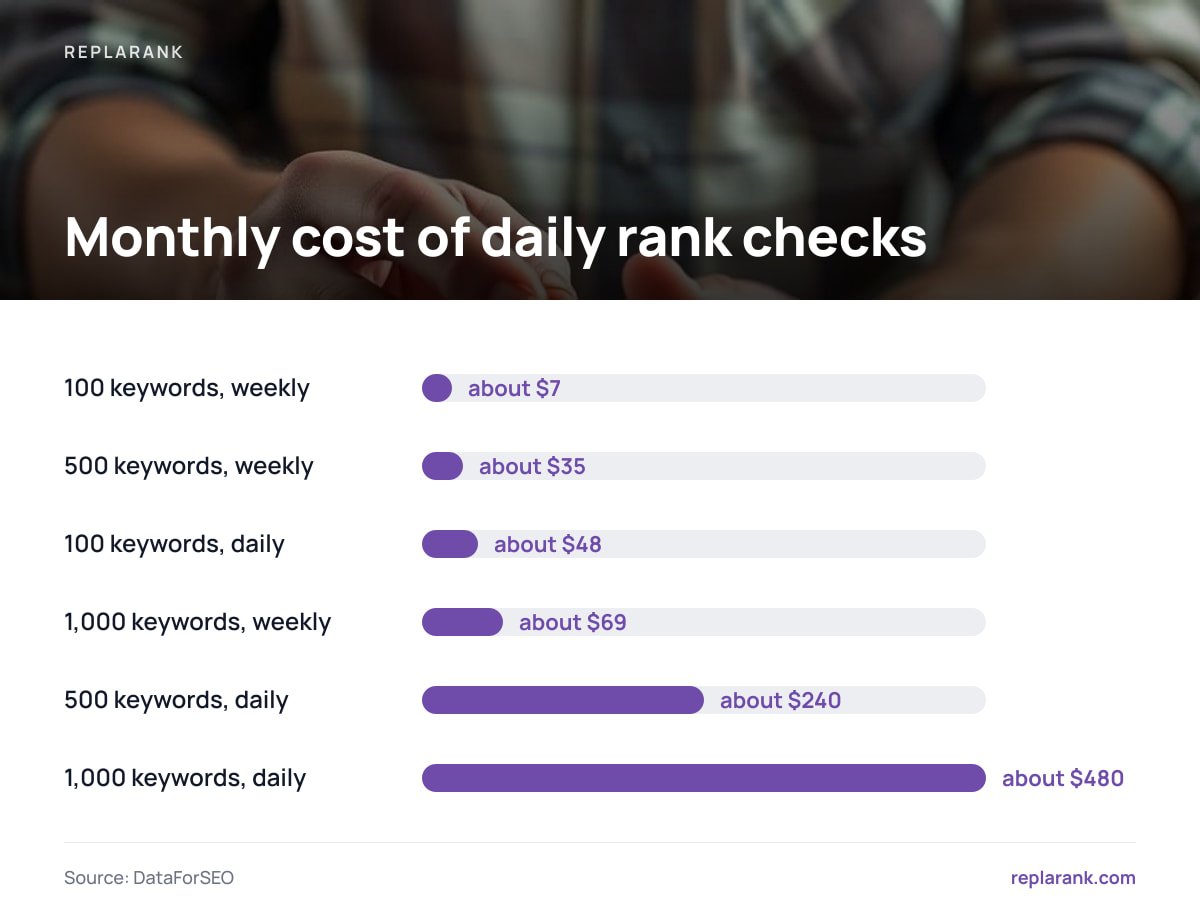
That unit cost makes the math simple. Here is the monthly cost by volume and frequency, using 30 days for daily and 4.33 weeks for weekly:
| Keywords tracked | Weekly checks per month | Daily checks per month |
|---|---|---|
| 100 | about $7 | about $48 |
| 500 | about $35 | about $240 |
| 1,000 | about $69 | about $480 |
Compare that with a $49-a-month entry-level subscription. At 500 keywords checked daily, per-check pricing runs about $240 a month. The subscription is cheaper by roughly $190, as long as its plan covers your keyword count (check the caps on keywords and sites before you assume it does).
500 keywords checked daily at about 1.6 cents each is roughly $240 a month, nearly five times a $49 subscription.
For a deeper breakdown of how per-call billing behaves, see API Costs: How You Get Billed, and When Per-Call Pricing Wins.
Daily or Weekly: The Cadence Decision That Sets Your Bill
Most teams default to daily checks because it feels more rigorous. For most keyword sets, it is not.
Rankings for established pages usually move over days and weeks, not hours. A weekly check catches a real decline with a delay of at most a week. Daily checks mostly add noise, because day-to-day fluctuations can look like movement when nothing changed.
Daily makes sense in narrow cases: a launch week, a migration, an algorithm update you are actively diagnosing, or a small set of revenue-critical terms. Everything else is cheaper and just as informative at weekly cadence.
Pro Tip: Tier your keywords instead of picking one cadence for all of them. Check your 50 revenue-critical terms daily and the other 450 weekly. That costs about $55 a month at per-check rates, against $240 for 500 daily. You keep fast detection where a lost position costs money and slow, cheap monitoring everywhere else.
When a Subscription Is Cheaper, and When Owning the Tool Wins

I will say it plainly: a subscription is cheaper if you check hundreds of keywords every day for a small number of sites. The per-check math cannot compete with a flat fee at that volume.
Ownership wins in other scenarios:
- Weekly checks on small keyword sets. At 100 keywords weekly, you spend about $7 a month on data. Against a $49 plan, a $399 one-time purchase pays back in roughly 9.5 months.
- Many sites or many users. Subscriptions typically price by keyword and project count. A self-hosted tool has no per-site or per-seat fee.
- Agencies with several clients. Isolated brands, each with its own spend limit, keep one client's checking from eating another's budget.
- Long time horizons. At 500 keywords weekly, break-even against $49 is around 28 months. After that, you keep the savings.
For the full ownership-versus-rental comparison, read One-Time vs Monthly SEO Tools: Where Each Wins on Cost. For the broader buying picture, Rank Tracking Tools: The Cost Trade-Off Nobody Explains covers what else varies between products.
Why a Drop in Keyword Rankings Is Often a Page Problem
A position chart tells you something moved. It does not tell you why. A surprising share of sudden drops are mechanical: a page that now returns a 404, a redirect chain that broke after a deploy, a stray noindex tag, or a canonical pointing somewhere unintended.
Google's documentation on blocking indexing with noindex is explicit that a page carrying the directive is dropped from results once Google recrawls it. Google's own guide to debugging drops in search traffic tells you to separate technical causes from algorithm or demand changes before you act. Those are different fixes, and the order matters.
So pair position data with page checks on desktop, mobile, or both. If a keyword fell and the URL is healthy, look at content and competitors. If the URL is broken, fix that first and skip the content rewrite. Layering real click data from Search Console on top tells you whether the drop cost you traffic or just a vanity metric.
For tracking across countries without blending results, How to Track Global Keyword Rankings Without Blended Data covers location handling in detail.
Own Your Rank Tracker for $399 and Pay Search Data at Cost
ReplaRank is a self-hosted rank tracker you buy once for $399 and run on your own server. You pay DataForSEO directly at cost, about 1.6 cents per fresh check. It tracks mobile rankings across 35 countries, runs page-health checks (404s, redirects, noindex, canonical issues), and syncs Search Console daily, keeping query-and-date history past Google's 16 months. Exports are CSV, and login-free share links carry noindex. There are 50 MCP tools, five of them for Search Console, over a local stdio server for Claude Desktop, Claude Code, and Cursor.
The caveat is the one in the numbers above: daily checking at volume costs more than a subscription. At 500 keywords daily you would pay about $240 a month against $49. ReplaRank wins on weekly checks, small keyword sets, unlimited sites and users, and owning the software. If your use is high-volume daily tracking, rent instead.
Frequently Asked Questions
How do I check my keyword rankings for free?
Use Search Console for your own site. It shows queries, impressions, clicks, and average position, with 16 months of history. For a quick one-off lookup of a specific keyword, a free rank checker works, but it will not give you history or reliable location control.
Why does my keyword ranking differ between tools?
Each tool measures something different. Search Console averages position across all impressions, while a tracker records a single check from a fixed location and device. Personalization and location also change what real users see, so small gaps are normal.
How often should I check keyword rankings?
Weekly is enough for most keywords, since established rankings move over days or weeks. Check daily only during launches, migrations, or algorithm updates, and for a short list of revenue-critical terms.
How much does it cost to track keyword rankings?
With per-check pricing at about 1.6 cents, 100 keywords weekly costs around $7 a month, and 500 keywords daily costs around $240. A flat $49 subscription is cheaper at high daily volume, while per-check or self-hosted pricing wins at low volume and weekly cadence.
Can Search Console replace a rank tracker?
Partly. It gives you real click and impression data but only for queries where you already appear, and it reports averages rather than fixed-location positions. A tracker adds keywords you have not ranked for yet and point-in-time checks.