

SEO rank tracking is the practice of recording where a page sits in search results for a target keyword, over time, across devices and locations, so you can prove whether your optimization work moved the needle. The distinction that matters isn't which tool checks the most keywords — it's whether the tool also explains why a position moved, because a dropped ranking and a page that quietly returned a 404 look identical in a graph but demand completely different fixes.
TL;DR:
- Rank tracking records position, not cause — a drop from a real algorithm shift and a drop from a broken redirect look the same on a graph without page-health data.
- Desktop-only tracking overstates how a site actually performs, since mobile results carry different local packs, snippets, and layouts entirely.
- Daily checking at volume is expensive: roughly 500 keywords tracked every day runs about $240 a month in raw search-data cost alone, more than most monthly subscriptions.
- Free rank checkers work for a one-off spot check; they fall apart the moment you need history, multiple sites, or more than a handful of keywords.
- Google Search Console tells you clicks and impressions; a rank tracker tells you position. Neither replaces the other, and reading only one gives you half a picture.
Table of Contents
- What SEO Rank Tracking Actually Measures (and What It Doesn't)
- Desktop vs. Mobile: Why Your Rankings Tool Might Be Lying to You
- The Real Cost of Checking Rankings Daily (Table Included)
- Free Rank Checkers vs. Paid Rank Trackers: Where the Line Is
- Page-Level Diagnostics: The Thing Most Rank Trackers Skip
- Search Console Data vs. Rank Tracker Data: Use Both, Not Either
- How Often You Should Actually Check Rankings
- Get Mobile and Desktop Rankings You Can Actually Explain
- Frequently Asked Questions
- Sources
What SEO Rank Tracking Actually Measures (and What It Doesn't)
A rank tracker sends a search query to Google, records which URL appears and at what position, and repeats that on a schedule. That's the whole mechanism — it's conceptually simple, which is why dozens of tools compete on the same feature. What it doesn't do, by default, is tell you whether the page it's checking still exists, still resolves without a redirect, or still allows Google to index it. A position graph showing a keyword falling from #4 to #19 looks identical whether the cause is a competitor's content update or your own developer accidentally adding a noindex tag during a site migration — and Google Search Central's documentation on the noindex directive is explicit that a single misplaced tag is enough to pull a page from results entirely.
This is the gap worth understanding before you pick a tool: position data and page-health data answer different questions, and most rank trackers only give you one of them.
Desktop vs. Mobile: Why Your Rankings Tool Might Be Lying to You

Checking only desktop rankings when the majority of your traffic arrives on phones produces a number that's technically accurate and practically useless. Mobile SERPs render different local packs, different featured snippets, and different ad placements than desktop, which means the same keyword can show a genuinely different ranking URL depending on device. If your dashboard reports a #3 position and your actual mobile visitors are landing on a page that ranks #11, you're optimizing against a number nobody searching on a phone ever sees. We cover this gap in more detail in our breakdown of mobile SERP tracking, but the short version is: if your audience skews mobile, your primary tracking view should too.
Pro Tip: Don't just split tracking by device — split it by country if you serve more than one market from the same domain. A keyword ranking #2 in the US and #14 in Canada will average out to a misleading "#8 overall" in any tool that blends geographies, and that blended number will send you chasing a problem that only exists in one country.
The Real Cost of Checking Rankings Daily (Table Included)

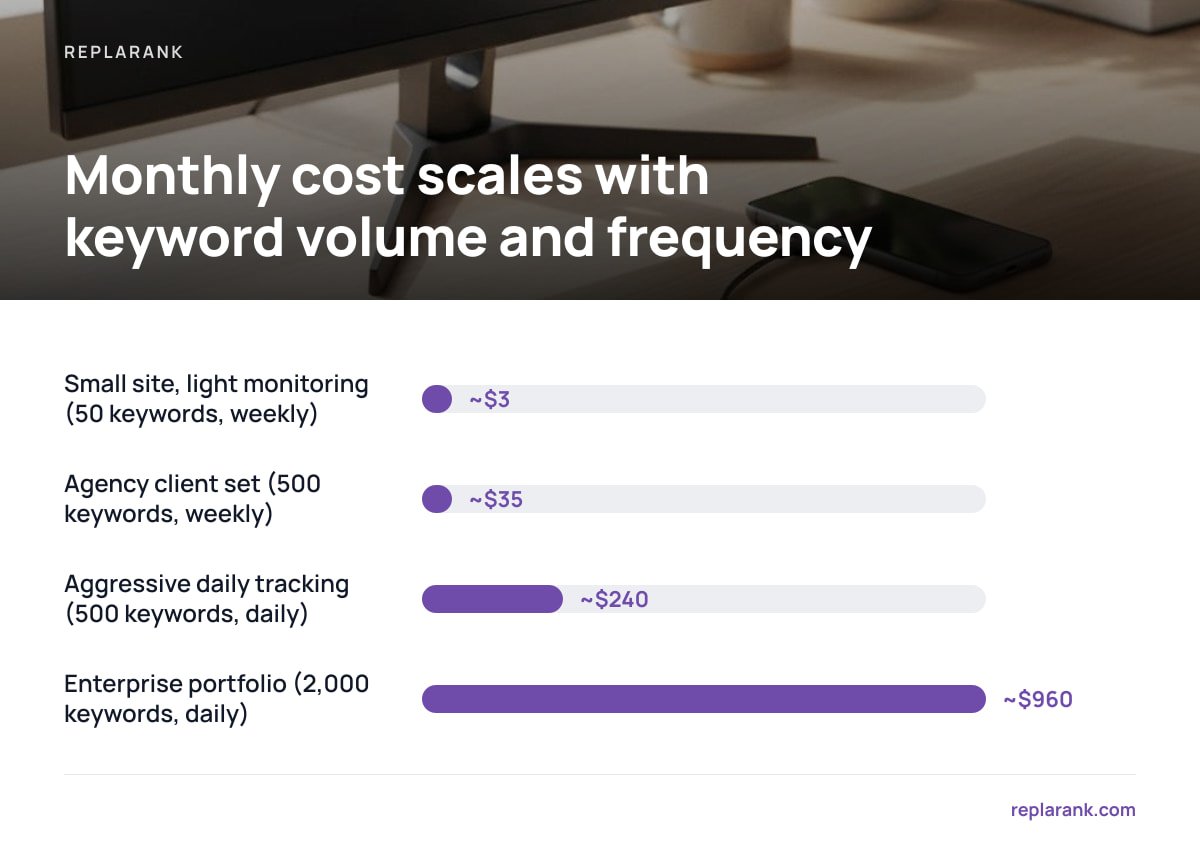
Every rank check costs money, because every check is a search-data API call, and search-data providers charge per query. The industry rounds to roughly 1.6 cents per fresh check. That number is small enough to ignore at low volume and large enough to dominate your budget at high volume, which is the trade-off almost no rank-tracker marketing page mentions.
500 keywords checked daily costs about $240 a month in raw search-data fees alone — more than most subscription rank trackers charge for the whole plan.
| Tracking pattern | Keywords | Frequency | Approx. monthly data cost |
|---|---|---|---|
| Small site, light monitoring | 50 | Weekly | ~$3 |
| Agency client set | 500 | Weekly | ~$35 |
| Aggressive daily tracking | 500 | Daily | ~$240 |
| Enterprise portfolio | 2,000 | Daily | ~$960 |
Read that table correctly and it tells you something most buyer's guides skip: daily tracking at volume is where self-hosted, pay-at-cost tools stop winning on price. A flat-rate subscription like Wincher's Basic tier, priced around $49 a month, is cheaper than paying per check once you're tracking hundreds of keywords every single day. Weekly checks, or tracking under a few hundred keywords, is where owning the infrastructure outright pulls ahead instead. We go through the math in full in our self-hosted versus SaaS comparison, because the right answer genuinely depends on your check frequency, not on which option sounds more modern.
Free Rank Checkers vs. Paid Rank Trackers: Where the Line Is
A free keyword rank checker — the kind that returns a single position for a single keyword, once, with no login — is a legitimate tool for a legitimate, narrow job: confirming whether a specific page ranks today. It is not a substitute for tracking. The moment you need to know whether a position moved since last Tuesday, free tools stop being useful, because they don't retain history. You're left screenshotting numbers into a spreadsheet, which works until you're managing more than one client or more than a dozen keywords.
- One-off verification. Use a free checker when a client asks "are we ranking for X" and you need a yes-or-no answer in thirty seconds, nothing more.
- Ongoing monitoring. Use a paid tracker — subscription or self-hosted — the moment you need a trend line, not a single data point.
- Multi-site management. Free tools don't scale past one or two sites without becoming a manual spreadsheet job; this is where the line between "checker" and "tracker" actually sits.
Page-Level Diagnostics: The Thing Most Rank Trackers Skip
This is the gap that costs agencies the most time. A ranking drop with no explanation sends someone down a rabbit hole of checking backlinks, re-reading the content, and second-guessing the keyword strategy — when the actual cause was a redirect chain introduced three weeks earlier during a CMS update, or a canonical tag silently pointing at the wrong URL. Checking page health alongside position (404s, redirect status, noindex tags, canonical mismatches) turns "the ranking dropped" into "the ranking dropped because the page started 302-redirecting to the homepage," which is a problem you can fix in an afternoon instead of a problem you spend a week investigating.
Pro Tip: When a ranking disappears suddenly rather than sliding gradually, check the page's HTTP status before you check anything else. A gradual decline over weeks usually points to a content or authority issue; a cliff-edge drop overnight points to something technical breaking.
Search Console Data vs. Rank Tracker Data: Use Both, Not Either

Google Search Console reports clicks, impressions, and an average position metric calculated across all the ways a URL appeared in results — including positions it held for queries you never intended to rank for. A rank tracker reports the specific position for the specific keyword you're monitoring, checked the way a real searcher would see it. Google's own documentation on the Performance report is clear that its average position figure is a blend, not a single clean number, which is precisely why it shouldn't be your only ranking signal.
The two data sources answer different questions and neither one replaces the other. Search Console tells you whether ranking changes are translating into real clicks; a rank tracker tells you the position itself, tracked consistently over time. One more limitation worth knowing: Google Search Console's help documentation states that performance data is retained for roughly 16 months by default — useful for a quarter-over-quarter check, useless for comparing this year's holiday season against last year's unless you've been exporting or syncing that data somewhere with longer retention.
How Often You Should Actually Check Rankings
SERPs move constantly for reasons that have nothing to do with your site — Moz's MozCast project, which tracks daily SERP volatility, regularly shows meaningful day-to-day flux even without any core algorithm update. Checking every single day on a small or stable keyword set mostly measures that background noise, not your actual progress. Weekly checks are enough for most sites that aren't actively mid-campaign; daily checks earn their cost during a migration, a major content push, or the week after a confirmed algorithm update, when you genuinely need to know fast. For a fuller breakdown of how frequency should match your actual situation rather than defaulting to "as often as possible," see our guide to tracking keywords without overpaying.
Get Mobile and Desktop Rankings You Can Actually Explain
ReplaRank is a self-hosted rank tracker, bought once for $399, that checks desktop and mobile positions across 35 countries and runs page-health checks — 404s, redirects, noindex tags, canonical issues — against every URL it tracks, so a dropped ranking comes with a reason attached instead of just a number. It also syncs daily with Search Console, keeping query-and-date history past Google's 16-month default, and runs as a local MCP server inside Claude Desktop, Claude Code, or Cursor for anyone who wants an AI assistant to pull that data directly.
The honest caveat: you pay the search-data provider directly at roughly 1.6 cents per check, so daily tracking of large keyword sets costs more than a flat-rate subscription — it's built to win on weekly checks, smaller keyword counts, and unlimited sites and users, not on checking thousands of keywords every day. Check the self-hosted versus SaaS math against your own check frequency before buying either way.
Frequently Asked Questions
What is the difference between SEO rank tracking and a one-time rank check?
A one-time rank check gives you a single position for a single keyword at a single moment, which is useful for quick verification but leaves no history. SEO rank tracking repeats that check on a schedule and stores the results, so you can see a trend line rather than a snapshot, which is what you actually need to prove whether optimization work is working.
Why do my rankings look different on mobile than desktop?
Google renders different SERP features by device — local packs, snippets, and layout differ between mobile and desktop results, and the ranking URL itself can even differ. A desktop-only rank tracker will report a position that your mobile visitors, who make up the majority of most audiences, never actually see.
How much does rank tracking cost if I check keywords every day?
A fresh rank check costs roughly 1.6 cents in raw search-data fees, so tracking 500 keywords daily runs about $240 a month in data cost alone — more than many flat-rate subscription plans charge in total. Daily tracking at that volume only makes financial sense during active campaigns, migrations, or the week after a confirmed algorithm update.
Is Google Search Console enough for rank tracking on its own?
No. Search Console's average position metric blends every way a URL appeared across all queries, which makes it a different and blunter measure than a dedicated rank tracker checking a specific keyword the way a real searcher would. The two data sources should be read together, since one shows clicks and impressions and the other shows clean, consistent position.
Are free rank checkers good enough for ongoing SEO work?
Free checkers are fine for a quick yes-or-no confirmation of today's ranking, but they don't retain history, so they can't show you a trend or help you diagnose a drop. The moment you're managing more than one site or need to see change over time, you need a tool built to store and track, not just check.
Sources
- Performance report documentation | Google Search Console Help
- Search Console data retention | Google Search Console Help
- MozCast SERP volatility tracker | Moz