

To switch rank tracker and keep historical data, export the full daily history as CSV before you cancel, then run the old and new trackers side by side for about two weeks. The export is the easy part. The real losses come from averaged data, mismatched keyword keys, and measurement differences that put a step change in your charts. Treat the switch date as an annotated break, not a seamless line.
TL;DR:
- Export raw daily rows (keyword, location, device, date, position, ranking URL) as CSV before you touch your cancellation button; many tools only export a summary.
- Define each keyword by four fields (text, country or city, device, language), or mobile and desktop history will silently merge.
- Run old and new trackers in parallel for 14 days, then annotate the switch date with the measured offset instead of pretending the line is continuous.
- Google Search Console keeps only 16 months, so archive it separately if you want click history that outlasts any tracker.
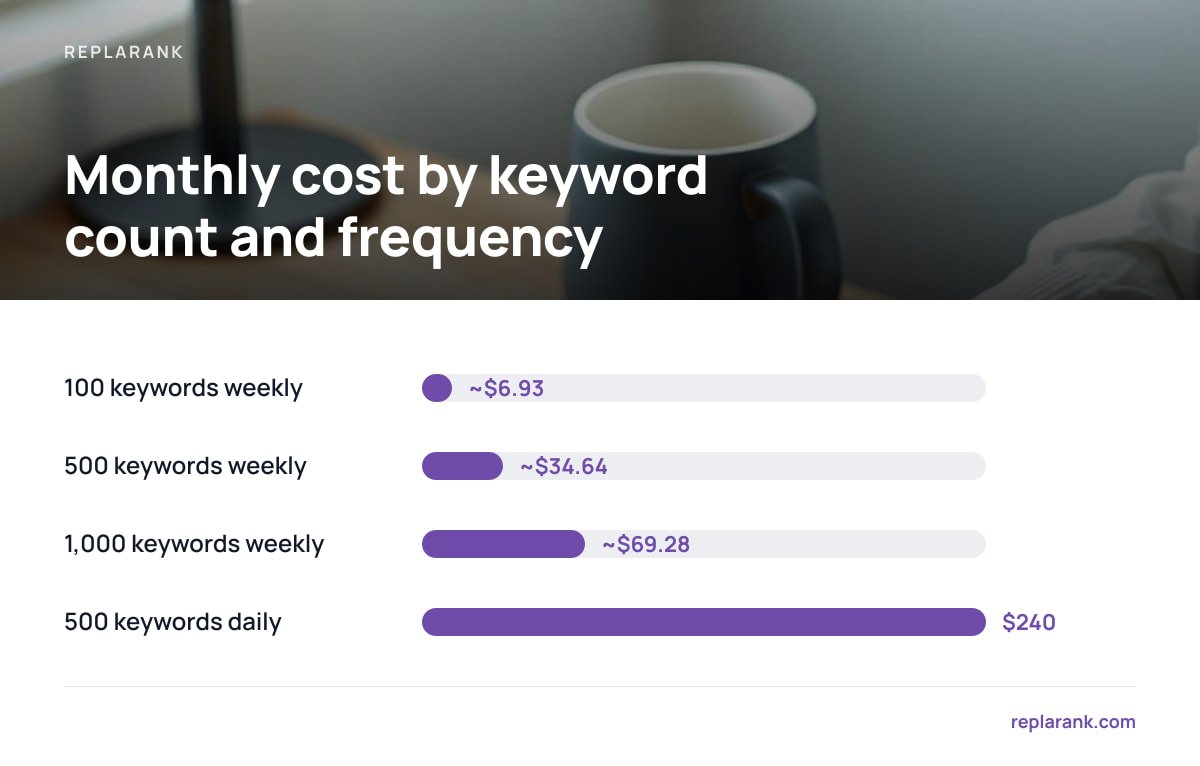
- A fresh check costs about 1.6 cents in a pay-per-check model, so weekly tracking is cheap and daily tracking of 500 keywords (about $240 a month) is not.
Table of Contents
- Why Rank Tracker Switches Lose Data, and Where It Disappears
- Export First: The Fields Your History File Must Contain
- Daily, Weekly, or Averaged: Check What the Export Actually Contains
- Run Both Trackers for 14 Days, So the Break in Your Chart Has a Number
- Search Console Is Your Second Copy, but Only for 16 Months
- Cancel Date, Deletion Policy, and the Billing-Cycle Trap
- What the New Tracker Costs When You Re-Baseline
- Get Rank History You Own, Without Renting It Again
- Frequently Asked Questions
- Sources
Why Rank Tracker Switches Lose Data, and Where It Disappears
Most history loss is not a dramatic deletion. It is a quiet downgrade: you export a file, it looks complete, and three months later you discover it held weekly averages, no ranking URLs, and no device column. By then the old account is closed.
A quick note if you arrived from forum threads about Apex Legends or a Nintendo Switch stat tracker: this article is about SEO keyword positions in Google search results, not game stats. The checklist below applies to anyone moving between SEO rank trackers.
The goal here is narrow: what to verify before you move. If you are still deciding which tool to move to, the buyer's breakdown on tracking keyword rankings without overpaying covers that. Come back here once you have chosen.
Four things go missing in a typical switch:
- Granularity. Daily rows get rolled up into weekly or monthly summaries in the export.
- Context. The ranking URL, SERP features, and tags or groups are dropped from the file.
- Identity. A keyword tracked on mobile in Chicago and on desktop nationally becomes two rows with the same text.
- Access. The account is deleted at the end of the billing period, and nobody told you.
Export First: The Fields Your History File Must Contain

Pull the export before you evaluate anything else. If the tool cannot give you the data in a form you could rebuild a chart from, you have learned something important before spending a cent on the replacement.
Ask for the raw file, not the report. Save it as plain UTF-8 CSV, the format described in RFC 4180, because it opens in any spreadsheet, database, or script a decade from now. Then check the columns against this table.
| Field | Why you need it | What breaks if it's missing |
|---|---|---|
| Keyword text | The obvious identifier | Nothing, usually present |
| Country / city / language | Rankings differ by location | Local and national history merge |
| Device (mobile / desktop) | Mobile and desktop SERPs differ | Two series collapse into one |
| Date of each check | Lets you rebuild the time series | You only get a snapshot |
| Position | The metric itself | Everything |
| Ranking URL | Shows cannibalization and URL swaps | You can't explain a drop |
| Tags / groups | Your own segmentation | Hours of re-tagging later |
Check the row count. Take one keyword you know was tracked daily for a year and count its rows. If you see 52 instead of 365, you have a weekly summary, not history.
Daily, Weekly, or Averaged: Check What the Export Actually Contains
Granularity is where the polite lie lives. A dashboard chart can look daily while the underlying export is smoothed. Test it with one volatile keyword, one that jumped around last quarter. Compare three specific dates in the chart to the same dates in the file.
If they disagree, you have two choices. Ask support whether a raw export exists, since some tools offer one by request or through an API. Or screenshot and record the key charts for your most important keywords before cancelling. That is ugly, but a screenshot of a lost chart beats an apology to a client.
My position: the raw daily file is the only acceptable archive. A weekly average hides exactly the events you will want to investigate later, such as a two-day drop after a deploy.
Run Both Trackers for 14 Days, So the Break in Your Chart Has a Number
Even with a perfect export, two trackers will not agree. They differ on how they count position when there are featured snippets, local packs, or People Also Ask boxes, on how they handle personalization, and on which data center they query. Splice the two histories together without checking and you will see a "ranking improvement" that is only a measurement change.
The fix is an overlap period. Track the same keywords in both tools, same location, same device, same schedule, for at least two weeks. Then compute the difference per keyword and the median across the set. 14 days gives you enough readings to average out normal daily movement.
Two trackers measuring the same keyword on the same day will often disagree by a position or more. Without an overlap period you cannot tell a real ranking change from a change of instrument.
Record the median offset and the switch date in a note stored with the archive. Do not rewrite old numbers to "correct" them. Annotate the break and leave the originals alone.
Pro Tip: Before the overlap, build a keyword key by concatenating text, country or city, device, and language into one column (for example running shoes|us-chicago|mobile|en). Join old and new data on that key, not on keyword text alone. Teams that skip this step typically discover months later that their mobile history has been overwritten by desktop rows, and by then the old export is gone.
Search Console Is Your Second Copy, but Only for 16 Months
Rank trackers record where you appeared. Search Console records what Google says happened: impressions, clicks, average position by query and date. It is the one history you do not have to ask a vendor for, and it is a useful cross-check during a switch.
The catch is retention. Google's Search Console documentation states that the Performance report covers the past 16 months.
Google Search Console keeps 16 months of performance data. Anything older than that is gone unless you stored it yourself.
There are two ways to keep it. You can pull query-and-date data through the Search Analytics API on a schedule and store it. Or you can set up Google's bulk data export to BigQuery, though that only collects from the day you enable it. Either way, start today, because you cannot recover months you did not capture. If you want the broader math on free checks versus paid ones, keyword rankings: free checks, paid costs, and the real math lays it out.
Cancel Date, Deletion Policy, and the Billing-Cycle Trap
Before you click cancel, find out three things in writing, from the vendor's help pages or support:
- Retention after cancellation. Some accounts go read-only, some are deleted within days. Ask for the exact number of days.
- Export limits. Cap on rows per file, cap on exports per day, and whether bulk export is behind a higher plan.
- Downgrade behavior. If you drop to a cheaper plan instead of canceling, does history older than a set window get trimmed?
Then set your calendar. Export at least a week before the renewal date, verify the file, and only then cancel. If the file is bad, you still have time to fix it, or to pay for one more month, which is cheaper than losing three years.
For a wider view of how subscriptions and one-time tools compare over time, see one-time vs monthly SEO tools. The short version: with a subscription, your history lives in someone else's database, and your access ends when your payment does.
What the New Tracker Costs When You Re-Baseline
A switch is also when you decide how often to check, and that decision swamps the price of the tool. In a pay-per-check model, a fresh check costs roughly 1.6 cents, so cost scales with keywords times frequency.
| Keywords | Frequency | Checks / month | Approx. cost at 1.6¢ |
|---|---|---|---|
| 100 | Weekly | ~433 | ~$6.93 |
| 500 | Weekly | ~2,165 | ~$34.64 |
| 1,000 | Weekly | ~4,330 | ~$69.28 |
| 500 | Daily | 15,000 | $240 |
Be clear-eyed about this. At 500 keywords checked daily, a $49 monthly subscription is far cheaper than paying per check. Pay-per-check wins on weekly tracking, small keyword sets, and when you have many sites or users, because per-seat and per-site pricing never enters the picture.
My pick for most agencies: check the 20 to 50 money keywords daily (50 keywords daily is about $24 a month) and everything else weekly. That keeps the history dense where decisions get made. For how API billing works underneath, see API costs: how you get billed, and when per-call pricing wins.
Get Rank History You Own, Without Renting It Again
The problem this article describes is simple: your history sits inside a vendor's account, and it only stays accessible while you keep paying. ReplaRank is a self-hosted rank tracker you buy once for $399 and run on your own server. Positions are stored in your database, you pay the search-data provider (DataForSEO) directly at cost, and CSV export means the data can leave whenever you want. Its Search Console sync runs daily and keeps history past Google's 16 months, by query and date, so you stop losing the oldest months.
There are limits. Fresh checks cost about 1.6 cents each, so daily tracking of 500 keywords runs roughly $240 a month, well above a $49 subscription. ReplaRank pays off on weekly checks, smaller keyword sets, or many sites and users. It also only records from the day you start, so keep your old export as a separate archive.
Frequently Asked Questions
Can I import my old rank tracker history into a new tool?
Some tools accept CSV imports and many do not, so check before you commit. Whatever the answer, keep the original raw export in storage as your source of truth. An archive you control is more reliable than any import feature.
How long should I run two rank trackers in parallel?
Fourteen days is a practical minimum, because it gives you enough daily readings to separate the measurement offset from normal ranking movement. Use identical keywords, locations, devices, and schedules. Record the median difference and annotate the switch date.
Does Google Search Console replace a rank tracker's history?
No. Search Console reports average position for queries that earned impressions, and it keeps only 16 months of data. A rank tracker checks specific keywords on a schedule, including ones where you get no impressions, so the two answer different questions.
What if my old tracker only exports weekly averages?
Ask support whether a raw daily export or API access exists, and test it against known dates before relying on it. If only summaries are available, export those, capture screenshots of key charts, and start your new daily history immediately. Do not cancel before you have what you can get.
Will my historical rankings look different in the new tracker?
Yes, usually. Trackers differ in how they count position around SERP features, which data centers they query, and how they handle personalization. An overlap period lets you measure that difference and mark it on your charts.
Sources
- Performance report (Search Console Help) | Google Search Console Help
- Search Analytics: query | Google for Developers
- About bulk data export | Google Search Console Help
- RFC 4180: Common Format and MIME Type for CSV Files | IETF / RFC Editor