

You pay monthly for rank tracking software because a subscription bundles search data, hosting and reporting into one predictable bill. At high daily volume, that bundle is cheaper than buying the data yourself. What decides it is how often you check. At roughly 1.6 cents per fresh check, 500 keywords checked daily cost about $240 a month in raw data. The same set checked weekly costs about $35.
TL;DR:
- Rank tracking cost is driven by checks per month, which is keywords × devices × countries × frequency. Keyword count alone tells you little.
- At about 1.6 cents per fresh check, 500 keywords tracked daily cost roughly $240 a month in raw data, nearly five times a $49 entry-level subscription.
- The same 500 keywords tracked weekly cost about $35 a month. At 100 keywords weekly, a $399 one-time tool pays for itself in under a year.
- Subscriptions win on heavy daily tracking and on built-in extras like scheduled client reports. Owning wins on weekly cadence, many sites, many users and keeping your data.
- Google Search Console keeps only 16 months of performance data, so long-term history depends on a tool that stores it for you.
Table of Contents
- What Your Monthly Fee Actually Buys, and What It Doesn't
- Why Pay Monthly for Rank Tracking Software When the Data Costs 1.6 Cents?
- Where a Subscription Is Genuinely Cheaper, and You Should Buy One
- Where Owning Wins: Weekly Cadence, Many Sites, Many Users
- Hidden Costs on Both Sides: Devices, Countries, Servers and Your Time
- Data You Keep vs. Data You Rent: Search Console's 16-Month Limit
- A Decision Rule You Can Apply in Five Minutes
- Stop Renting a Rank Tracker You Only Check Weekly
- Frequently Asked Questions
- Sources
What Your Monthly Fee Actually Buys, and What It Doesn't
A rank tracking subscription is a bundle. Your monthly fee pays for SERP data pulled from a search-data provider, the servers that store your history, the people who build and support the product, and the vendor's margin. Most plans are tiered by some mix of tracked keywords, update frequency, number of sites and number of user seats.
The raw data is a priced commodity, and that is the part most buyers never see. Providers like DataForSEO publish per-request pricing, and a fresh live check of one keyword on one device in one location works out to roughly 1.6 cents. Everything above that on your invoice is packaging: storage, interface, reports, support and profit.
Packaging can be worth paying for. A subscription means no server, no updates and no billing account with a data provider. Many plans also include features some teams need, like scheduled emailed reports and branded client dashboards. The question is whether you use enough of the package to justify renting it forever. For a primer on what trackers measure in the first place, see what a keyword rank tracker measures and what it really costs.
Why Pay Monthly for Rank Tracking Software When the Data Costs 1.6 Cents?
Your real unit of cost is the check, not the keyword. One keyword tracked on mobile and desktop in two countries is four checks every time it updates. Multiply by how often you update, and the monthly number moves faster than most people expect.
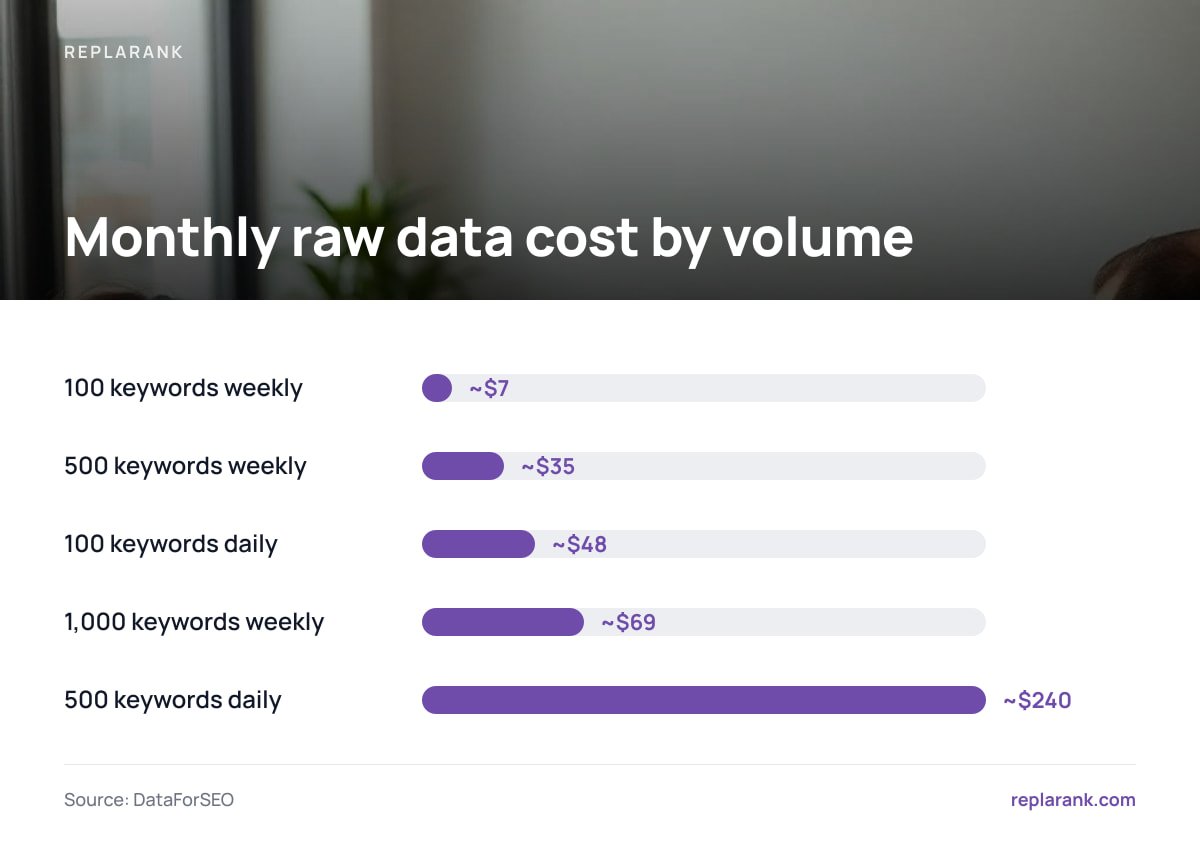
The table below compares raw data cost at about 1.6 cents per check against a $49-a-month entry-level subscription. A week averages 4.33 per month. The last column shows how many months the savings take to cover a $399 one-time purchase, before any server cost.
| Keywords (1 device, 1 country) | Cadence | Checks per month | Data cost per month | Months to recover $399 vs. $49/month |
|---|---|---|---|---|
| 100 | Weekly | ~433 | ~$7 | ~10 |
| 500 | Weekly | ~2,165 | ~$35 | ~28 |
| 1,000 | Weekly | ~4,330 | ~$69 | Never: subscription is cheaper |
| 100 | Daily | ~3,000 | ~$48 | Effectively never |
| 500 | Daily | ~15,000 | ~$240 | Never: subscription is ~5× cheaper |
500 keywords checked daily cost about $240 a month in raw search data. Against a $49 subscription, that is close to five times the price for the same rankings.
The conclusion is simple. Daily tracking at volume is where subscriptions earn their fee, because the vendor buys data in bulk and spreads it across thousands of customers. Weekly tracking of a modest keyword set is where you overpay, because you are renting capacity you never use.
Where a Subscription Is Genuinely Cheaper, and You Should Buy One
If you check more than about 100 keywords every day, the subscription is almost certainly the better deal on cost alone. At 100 keywords daily, raw data already runs about $48 a month, roughly the price of an entry plan, before you have paid anything for the software. At several hundred daily keywords, the gap gets wide enough that self-hosting makes no financial sense.
Subscriptions also win when you need features a self-hosted tool may not include:
- Scheduled client reports. If clients expect a PDF in their inbox every Monday without anyone touching it, a SaaS plan that automates this saves real hours.
- White-label dashboards. Agencies that present tracking under their own brand usually need a hosted product built for it.
- Zero infrastructure. If nobody on your team can maintain a server, the operational risk of self-hosting outweighs the savings.
- Broader tracking types. Map-grid local tracking, Bing tracking and similar specialist features are more commonly found in hosted products.
If any of these describe your work, pay monthly and stop second-guessing it. That is a rational purchase, not a trap.
Where Owning Wins: Weekly Cadence, Many Sites, Many Users

The economics flip when your checks per month are low or your account limits are high. Most SEO decisions do not need daily data. A position change you would act on is visible in a weekly series, and daily noise from SERP volatility often makes trends harder to read.
Owning a tracker wins in three situations:
- Small or weekly keyword sets. At 100 keywords weekly, you spend about $7 a month on data. A $399 purchase recovers its cost against a $49 plan in about ten months, and everything after that is savings.
- Many sites or many seats. Subscription tiers often cap sites and users, which pushes agencies onto bigger plans for the same keyword volume. If your realistic alternative is a $129 tier rather than $49, rerun the table. At 1,000 weekly keywords (~$69 in data), payback against $129 drops to under seven months.
- Long time horizons. A subscription costs the same in year three as in year one. A one-time purchase gets cheaper every month you keep using it.
Pro Tip: Do not set one cadence for your whole keyword list. Track the 20 to 50 terms that drive revenue daily for two weeks after a site migration, redesign or confirmed Google update, then drop them back to weekly. Keep the long tail weekly or fortnightly permanently. On per-check billing, this split can cut your data cost by more than half, and you lose none of the signal you would act on.
For a fuller side-by-side of the two models, read SEO rank tracker: self-hosted vs. SaaS and when each wins.
Hidden Costs on Both Sides: Devices, Countries, Servers and Your Time

Neither model's sticker price is the full price. On the per-check side, the multipliers are devices and locations. Google uses mobile-first indexing, so mobile rankings are the ones most sites should watch. Adding desktop for every keyword doubles your checks, and that is usually waste. Tracking in five countries multiplies checks by five. See rankings by country and what tracking them costs before you add markets.
Self-hosting also needs somewhere to run. If you already operate a server, the marginal cost is close to zero. If you rent a small VPS just for this, add its monthly fee to the data cost in the table above, and your payback period gets longer. Updates, backups and the occasional broken dependency are your responsibility, and your time has a price.
On the subscription side, the hidden costs are overage charges, seat fees and tier jumps. Adding one more client site can push you into a plan that costs twice as much for capacity you use 20 percent of. Read the plan limits before you compare prices, not after the first invoice.
Data You Keep vs. Data You Rent: Search Console's 16-Month Limit

Ranking history is only useful if you still have it when you need it. With a subscription, your history lives in the vendor's database. If you cancel, you keep whatever you exported and nothing else. Check the export format and limits before you commit years of data to any platform.
Google's own data has a hard expiry. The Search Console Performance report shows clicks, impressions and positions, but only for a rolling window.
Google Search Console keeps 16 months of performance data. Anything older is gone unless something outside Google stored it first.
Year-over-year comparisons across two full seasons, or a before-and-after view of a migration that happened two years ago, require a tool that syncs Search Console regularly and keeps the rows. A self-hosted tracker writes that history to a database you control. Nobody can delete it at renewal time, and you can query it however you like.
A Decision Rule You Can Apply in Five Minutes
Work out your checks per month: keywords × devices × countries × updates per month. Multiply by $0.016. Then compare that figure, plus any server cost, against the subscription tier you would actually need, including the site and seat limits that apply to you.
Pay monthly if
- Your monthly data cost from the formula is at or above the subscription price.
- You track hundreds of keywords daily and need daily data for all of them.
- You need scheduled emailed reports, white-label dashboards, map-grid local tracking or Bing rankings.
- Nobody on your team will maintain a server.
Buy once and self-host if
- Your data cost is well under your subscription price, typically weekly cadence or under about 100 daily keywords.
- You manage many sites or many users and keep hitting tier limits.
- You want rank and Search Console history that outlives any vendor relationship.
- You plan to keep tracking for two years or more.
If you are a solo consultant or small agency tracking a few hundred keywords weekly across several client sites, own the tool. If you run daily tracking on thousands of keywords, pay the subscription. Broader trade-offs are covered in rank tracking software: self-hosted vs SaaS, and when each wins.
Stop Renting a Rank Tracker You Only Check Weekly
ReplaRank is a self-hosted rank tracker you buy once for $399 and run on your own server, paying DataForSEO directly at cost. That is roughly 1.6 cents per fresh check, with no markup. You get unlimited sites and users, isolated brands each with their own spend limit, and mobile tracking across 35 countries. Page checks flag 404s, redirects, noindex and canonical problems next to position history. A daily Search Console sync keeps clicks by query and date beyond Google's 16-month window, and a local MCP server exposes 50 tools to Claude Desktop, Claude Code and Cursor.
The honest limit: if you check hundreds of keywords every day, a subscription will cost you less, and you should buy one. There are no scheduled email reports and no white labelling. Clients get login-free, noindexed share links or a CSV export. Run the formula above against our numbers before you buy.
Frequently Asked Questions
Is self-hosted rank tracking always cheaper than a subscription?
No. At roughly 1.6 cents per check, 500 keywords tracked daily cost about $240 a month in raw data, while entry-level subscriptions often cost around $49. Self-hosting is cheaper mainly for weekly tracking, small keyword sets, or teams that would otherwise pay for higher tiers to get more sites and seats.
How do I calculate what rank tracking really costs me?
Multiply keywords by devices, by countries, by updates per month to get checks per month. Multiply that by the per-check data price, about $0.016, and add any server cost. Compare the result to the subscription tier you would actually need, including its site and user limits.
Do I need daily rank tracking?
Most sites do not need daily data for every keyword. Weekly updates show the trends you would act on, and daily movements are often SERP noise. Daily tracking is worth it for a small set of revenue-critical terms during migrations, redesigns or confirmed algorithm updates.
What happens to my ranking history if I cancel a subscription?
Your history stays in the vendor's database, and you keep only what you exported before cancelling. Check each tool's export options before committing years of data to it. A self-hosted tracker stores history in a database you control.
Why does Search Console data disappear after 16 months?
Google's Search Console Performance report only covers a rolling 16-month window, so older clicks and impressions drop off. To keep longer history, you need a tool that syncs Search Console data regularly and stores it outside Google.
Sources
- Pricing | DataForSEO
- Performance report (Search results) | Google Search Console Help
- Mobile-first indexing best practices | Google Search Central
- Block Search indexing with noindex | Google Search Central
- Model Context Protocol | Model Context Protocol