

A keyword rank tracker checks where your pages appear in Google for the search terms you choose, from a fixed location and device, on a schedule you set. The key distinction is between that sampled position and the averaged position Google Search Console reports for free. A tracker shows what one searcher in one place sees, and Search Console shows what real impressions averaged out to. Most SEOs need both. What you pay depends mostly on how often you check.
TL;DR:
- A keyword ranking is a sample: one position, for one query, from one location and device, at one moment.
- Google Search Console is the best free rank data available, but it only covers sites you own and reports averages, not snapshots.
- Tracker cost comes from checks per month, which is keyword count times frequency. Plan features matter less.
- At about 1.6 cents per check, a self-hosted tracker is cheaper on weekly checks or small keyword sets. A subscription is cheaper for hundreds of keywords checked daily.
- Many ranking drops are page problems, such as 404s, redirects, or a stray noindex, so pick a tracker that checks the page as well as the position.
Table of Contents
- What Keyword Rankings Are, and Why "Position 4" Is a Sample, Not a Fact
- What a Keyword Rank Tracker Measures That Search Console Can't, and Vice Versa
- Is There a Free Tool to Check Your Website's Keyword Rankings?
- The Cost Math: Keyword Count Times Check Frequency Decides Everything
- What the Best Keyword Tracking Tools Have in Common
- When a Ranking Drop Isn't a Ranking Problem
- YouTube, Google, and Other Rank Checkers: What Each Will and Won't Show
- Track Weekly, Pay Per Check, and Own the Tracker Outright
- Frequently Asked Questions
- Sources
What Keyword Rankings Are, and Why "Position 4" Is a Sample, Not a Fact
A keyword ranking is the position at which one of your URLs appears in a search engine's results for a specific query. If your page is the fourth organic result for "commercial roof repair," you rank fourth for that keyword. That is the textbook definition. What it leaves out is that the number depends on who is searching, where they are, and on what device.
Google's own How Search Works explainer says that information such as your location and settings helps tailor the results you see. A searcher in Denver and a searcher in Leeds can get different results for the same query. A phone and a laptop in the same room can too. So any single ranking is a measurement taken under specific conditions, the same way a temperature reading depends on where you put the thermometer.
This is why two rank trackers rarely agree to the decimal, and why neither one matches what you see when you search for yourself. Your own browser is the worst measurement instrument available, because it carries your location, your language settings, and your history. A tracker earns its keep by holding those conditions constant from one check to the next. That way a change in position means the results changed, not the measurement.
What a Keyword Rank Tracker Measures That Search Console Can't, and Vice Versa
A keyword rank tracker queries Google from a defined country and device and records where your URL appears. Google Search Console takes the opposite approach: it reports what actually happened across real searches. According to Google's Performance report documentation, Search Console shows clicks, impressions, CTR, and average position for the queries that surfaced your site. Most practitioners need both views.
| Rank tracker | Google Search Console | |
|---|---|---|
| What "position" means | Snapshot from one location and device | Average across all real impressions |
| Keywords covered | Any keyword you choose, including ones you don't rank for yet | Only queries where your site earned impressions |
| Competitor positions | Yes, for the same SERP | No |
| Sites covered | Any site | Only properties you have verified |
| Click data | No | Yes |
| Data lag | Immediate | Typically a couple of days |
| History | As long as your tool keeps it | 16 months |
The table explains most of the "my tracker says 3, Search Console says 7.4" complaints. Search Console averages in every location, device, and SERP layout where you appeared, including the long tail of users who saw you lower down. Your tracker reports one clean snapshot. Neither one is wrong. They answer different questions.
Search Console keeps 16 months of performance data. Anything older is gone unless you exported it before it aged out.
That limit matters more than it first seems. Year-over-year comparisons need at least 12 months of overlap, and diagnosing a slow two-year decline needs more than Google will keep for you. If historical query data matters to you, store it somewhere you control. For a deeper look at what both kinds of position data miss, see SEO rank tracking: what it actually measures and what it misses.
Is There a Free Tool to Check Your Website's Keyword Rankings?
Yes. The best free option is Google Search Console. It costs nothing, the data comes from Google itself, and it covers every query where your site appeared. The catches are that you must verify ownership of the site, it reports averaged positions rather than daily snapshots, and it hides rare queries for privacy reasons.
The free "website ranking checker" pages run by large SEO suites are a different product. They are lead-generation tools. Expect a handful of results per search, a sign-up wall, and no stored history. They are fine for a one-off answer to "where do I rank for this phrase right now?" They are useless for watching a trend, because a position is only meaningful compared with the same measurement last week.
Free tools are enough when:
- You only care about your own site. Search Console covers it, and its click data is better than anything a tracker can estimate.
- You track a few dozen terms casually. A manual check against Search Console once a week will catch most problems.
- You don't need competitor positions. Search Console can't show where rivals rank, and free checkers won't store it.
You outgrow free tools the moment you need client sites you can't verify, keywords you don't rank for yet, competitor positions, or country-by-country mobile data.
The Cost Math: Keyword Count Times Check Frequency Decides Everything

Every rank tracker, subscription or self-hosted, pays for the same raw material: live search-result queries bought from a data provider. The number that drives your bill is checks per month, which is keywords multiplied by how often you check each one. Plan names, feature tiers, and "unlimited" badges sit on top of that.
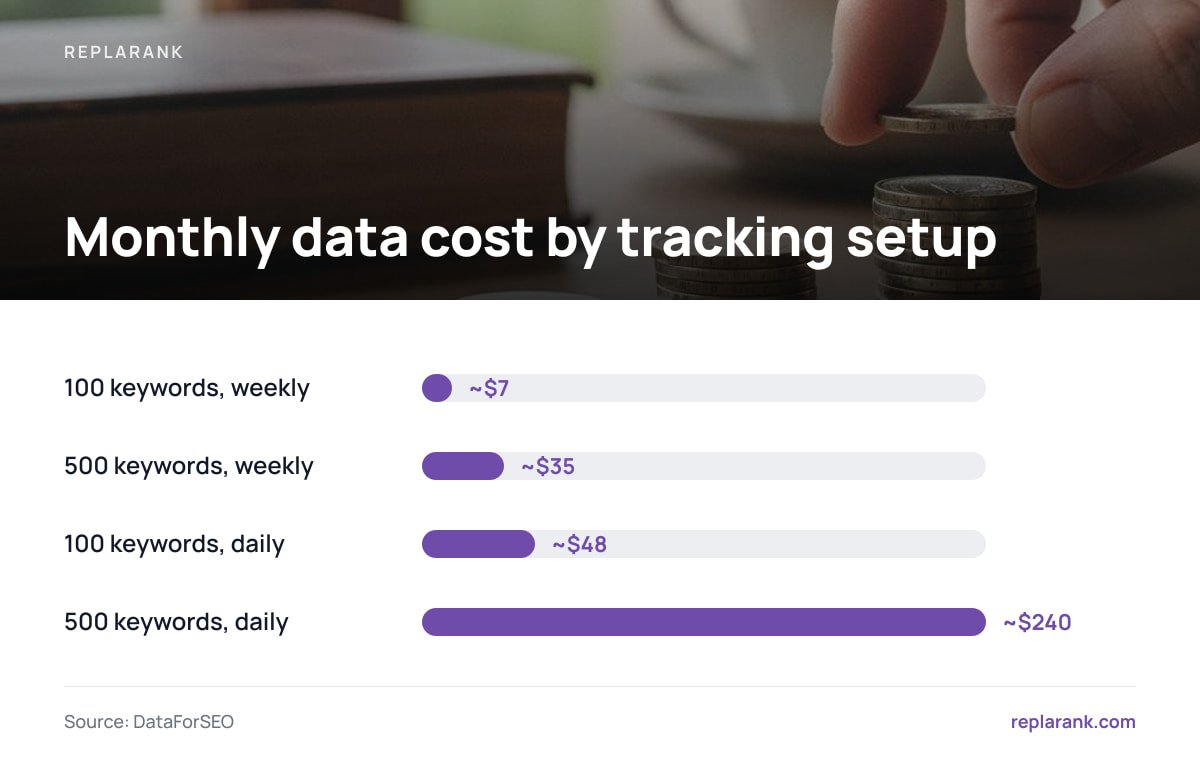
With a self-hosted tracker that pays the provider directly, the cost is visible. At roughly 1.6 cents per fresh check through DataForSEO, here is how common setups compare with a typical entry-level subscription at about $49 a month:
| Setup | Checks per month | Data cost at ~1.6¢ | Cheaper option |
|---|---|---|---|
| 100 keywords, weekly | ~433 | ~$7 | Self-hosted |
| 500 keywords, weekly | ~2,165 | ~$35 | Self-hosted |
| 100 keywords, daily | ~3,000 | ~$48 | Roughly even |
| 500 keywords, daily | ~15,000 | ~$240 | Subscription, by a wide margin |
At about 1.6 cents a check, 3,060 checks a month is the break-even line against a $49 plan. That is roughly 100 keywords checked daily, or about 700 checked weekly.
Those figures leave out the upfront license. A $399 one-time purchase spread over two years adds about $16.60 a month, which moves the break-even point lower still. The plain conclusion: if you check hundreds of keywords every day, a subscription is cheaper. Bulk pricing works in the subscriber's favor at that volume, and no amount of self-hosting enthusiasm changes the arithmetic.
The other side is just as plain. Most keywords don't need daily checks. Positions for a stable informational page rarely move in a way that a weekly reading would miss. Daily checking mostly produces noise, such as one-position swings from SERP testing, which tempts people into reacting to nothing. Rank tracking tools: the cost trade-off nobody explains works through more scenarios, including agencies with many small clients.
Pro Tip: Split your keyword list into two tiers. Check 10–20 "canary" keywords daily: your money terms and anything tied to a recent change. Check everything else weekly. A 500-keyword set with 20 daily canaries costs about $9.60 a month for the canaries plus about $34 for the weekly checks on the other 480, around $44 in total. Checking all 500 daily costs about $240, and you get the same early warning either way.
What the Best Keyword Tracking Tools Have in Common
"Best rank tracker software" lists rank by affiliate payout as often as by quality. A better approach is to judge any tool, including ours, against what actually affects your data and your bill.
Fixed, declared measurement conditions
The tool should say exactly which country, language, and device each check simulates, and let you set them per keyword. If it won't tell you where a check came from, you can't interpret a change. Mobile matters most here: most searches happen on phones, and mobile and desktop rankings for the same query often differ.
Visible cost per check
You should be able to work out what one more keyword costs you. Tools that hide this behind tier jumps make it hard to see when a cheaper setup would work, for example dropping half your list to weekly checks.
Search Console alongside snapshots
A tracker that pulls in Search Console data lets you see snapshot position, averaged position, and real clicks for the same query side by side. Without it you are comparing tabs and guessing.
History you keep
Rank data only matters over time. Check whether you can export it as CSV and whether it survives cancelling your plan. A tool that deletes three years of history when you stop paying is holding your data hostage.
Diagnostics on the ranking URL
A position tells you something changed. It does not tell you why. The best tools also check the page that ranks, which leads to the next section.
On the narrow question of which rank tracker software is best for SEO, our position is this. For daily tracking of a large keyword set, a mainstream subscription is the rational buy. For weekly tracking, small sets, many sites, or teams that want to own their data and tools outright, a self-hosted tracker paying data costs at cost is the better choice. SEO rank tracker: self-hosted vs. SaaS and when each wins sets out that decision in full.
When a Ranking Drop Isn't a Ranking Problem

A common mistake in rank tracking is treating every drop as an algorithm or competition problem. Often the page itself broke. It started returning a 404, got caught in a redirect chain after a migration, picked up a noindex from a staging template, or began declaring a different URL as its canonical. Google responded correctly, and your tracker recorded the result without explaining it.
- 404s and soft 404s. A deleted or renamed page drops out of the index. Its rankings fade over days, not hours, so the drop can look like a slow decline rather than a break.
- Redirect chains. Each extra hop adds failure points. A chain that ends somewhere irrelevant can leave the original keyword with no good URL to rank.
- Noindex tags. One line of markup, often shipped by accident in a CMS update, tells Google to drop the page completely.
- Canonical conflicts. If the page points its canonical somewhere else, Google may rank that other URL instead, or neither.
A quick way to tell a page problem from a search problem: if every keyword mapped to one URL drops in the same week while the rest of the site holds steady, check the URL before anything else. If drops are spread across many unrelated pages, look at the search results themselves. Diagnosing 404s and redirects hurting your rankings covers the full checklist.
YouTube, Google, and Other Rank Checkers: What Each Will and Won't Show
Searches for "YouTube keyword rank checker free" are common, and the answer is less satisfying than the search suggests. YouTube results are heavily shaped by watch history and subscriptions, so an outside "position" for a video means even less than a Google position does. The most reliable free data is in YouTube Studio's analytics. Its traffic-source reports show which YouTube search terms actually brought viewers to your videos. That tells you more than a simulated rank.
For Google web search, keep three things separate: the snapshot your tracker takes, the average Search Console reports, and the position you see when searching yourself. The first two are data. The third is an anecdote. Before you pay for any tool, confirm which search engines and surfaces it actually covers, and don't assume a "Google keyword rank checker" also tracks video, maps, or other engines.
Track Weekly, Pay Per Check, and Own the Tracker Outright

ReplaRank is a self-hosted keyword rank tracker you buy once for $399 and run on your own server. It installs with one command and has zero npm dependencies. You pay DataForSEO directly at cost, about 1.6 cents per fresh check, for mobile and desktop rankings across 35 countries. Sites and users are unlimited, and each brand gets its own isolated spend limit. It syncs Search Console daily and keeps history by query and date beyond Google's 16 months. It also checks the ranking page for 404s, redirects, noindex, and canonical issues, on desktop, mobile, or both. You can export to CSV, share login-free links that carry noindex, or query everything from Claude Desktop, Claude Code, or Cursor through a local 50-tool MCP server.
The honest caveat: if you check 500 keywords every day, expect a data bill of about $240 a month, and a $49 subscription will be cheaper. It also has no scheduled email reports and doesn't track Bing. It suits weekly checks, small keyword sets, and owning your data.
Frequently Asked Questions
What are keyword rankings?
A keyword ranking is the position at which one of your URLs appears in search results for a specific query, such as fourth for "commercial roof repair." Because results vary by location, device, and settings, every ranking is a measurement taken under specific conditions, not a fixed fact. That is why trackers hold those conditions constant between checks.
Is there a free tool that can check my website's keyword ranking?
Google Search Console is free and reports the average position, clicks, and impressions for every query where your verified site appeared. It does not cover sites you don't own, competitor positions, or keywords you don't rank for yet. Free online rank checkers can answer one-off questions but usually store no history.
Why does my rank tracker disagree with Google Search Console?
A rank tracker records a single snapshot from one country and device. Search Console averages your position across every real impression, in every location and SERP layout. A tracker reading of 3 next to a Search Console average of 7.4 is normal and usually means you rank lower for some searchers or regions.
How often should I check keyword rankings?
Weekly is enough for most keywords, because day-to-day movement is mostly noise. Check a small set of high-value or recently changed keywords daily and everything else weekly. This catches real problems early while cutting check volume, and cost, by a large margin.
Is a self-hosted rank tracker cheaper than a subscription?
It depends on volume. At roughly 1.6 cents per check, a self-hosted tracker is cheaper for weekly tracking or small keyword sets. A subscription is cheaper for hundreds of keywords checked daily, where 500 daily keywords costs about $240 a month in data against about $49 for an entry-level plan.
Sources
- Performance report (Search results) | Google Search Console Help
- How Search Works | Google
- Google Search Console | Google
- DataForSEO | DataForSEO