

The real difference between self-hosted and cloud SEO tools is who pays for what, and what happens when you stop paying. A cloud tool bundles the server, the search data and support into one monthly fee, and access ends when the fee does. A self-hosted tool is software you own on your own server, with search data bought at cost per check. Self-hosting wins on weekly checks, small keyword sets and data ownership. At high daily volume, a subscription is usually cheaper.
TL;DR:
- A cloud SEO tool rents you software, servers and search data as one bundle. A self-hosted tool separates them, so you pay for search data per check, at cost.
- At roughly 1.6 cents per fresh rank check, 500 keywords checked daily costs about $240 a month. An entry-level subscription at around $49 is far cheaper at that volume.
- Self-hosting pays off with weekly checks, small keyword sets, many sites or many users, because those cost nothing extra in the license.
- You can only keep Search Console data past Google's 16-month window if something stores it before it expires. Self-hosting puts that archive on your own disk.
- Cloud tools still win on polish: scheduled reports, white-label client portals and zero maintenance. Self-hosting suits people who would rather own the data than outsource the upkeep.
Table of Contents
- Self-Hosted vs Cloud SEO Tools: What Changes When You Move the Server
- The Per-Check Math, and Exactly Where a Subscription Is Cheaper
- What You Take On When You Self-Host, and What It Actually Costs You
- Data Ownership: Search Console's 16-Month Limit and What Disappears When You Stop Paying
- Clients, Users and Sharing: Where Cloud Tools Still Win
- AI Assistants and Automation: Local Servers vs Hosted Connectors
- Which One Should You Pick? A Straight Decision Rule
- Own Your Rank History for a One-Time $399, and Check Weekly Without a Seat Bill
- Frequently Asked Questions
- Sources
Self-Hosted vs Cloud SEO Tools: What Changes When You Move the Server

Every rank tracker has the same three parts. There is software that stores and charts positions, a server that runs it, and a search-data source that actually queries Google. A cloud tool sells you all three as one monthly line item. A self-hosted tool sells you only the software. You supply the server and pay the data provider directly.
Moving the server changes your cost structure more than your feature list. With a cloud subscription, your price is usually tied to keyword count, check frequency and sometimes seats or projects. With self-hosting, the license is fixed and the variable cost is the number of rank checks you run. More sites and more users cost nothing extra. More checks do.
Moving the server also changes what happens when you leave. When a cloud subscription lapses, your access to the dashboard and its history generally goes with it, unless you exported the data first. A self-hosted install keeps running on your machine whether or not you ever pay the vendor again. Your only remaining bill is the data provider, and only for new checks.
For a broader look at how these models compare for rank tracking specifically, see SEO Rank Tracker: Self-Hosted vs. SaaS and When Each Wins.
The Per-Check Math, and Exactly Where a Subscription Is Cheaper

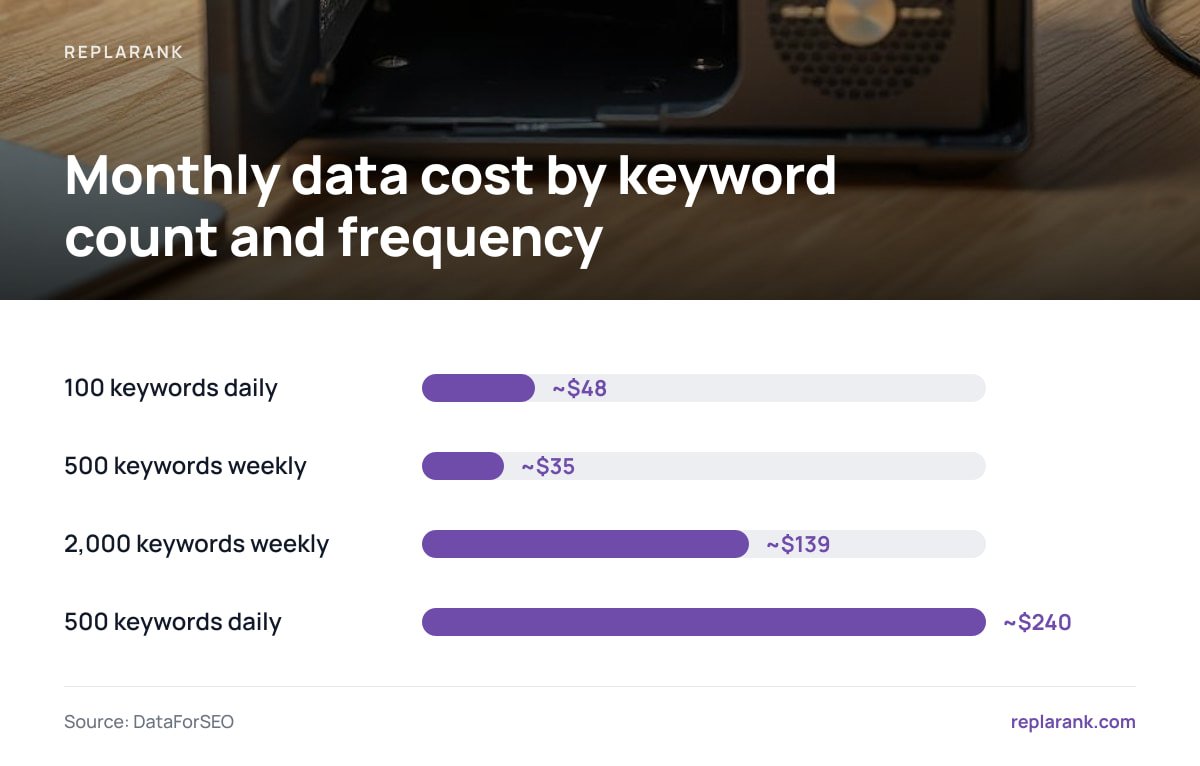
A fresh rank check bought at cost from a provider such as DataForSEO runs roughly 1.6 cents with a self-hosted setup. That one number decides most of this comparison. Multiply it by your keyword count and your check frequency, and you have your monthly data bill.
| Keywords | Check frequency | Checks per month | Data cost per month (~$0.016/check) | Entry-level subscription (~$49/mo) |
|---|---|---|---|---|
| 100 | Daily | ~3,000 | ~$48 | ~$49 (roughly break-even) |
| 500 | Daily | ~15,000 | ~$240 | ~$49 (subscription far cheaper) |
| 500 | Weekly | ~2,165 | ~$35 | ~$49 (self-hosted cheaper) |
| 2,000 | Weekly | ~8,660 | ~$139 | Depends on plan tier |
| 200 | Weekly, 10 client sites | ~866 per site group | ~$14 per 200-keyword set | Often priced per project or seat |
500 keywords checked daily is about 15,000 checks a month, roughly $240 at 1.6 cents each. The same 500 checked weekly is about $35.
Be plain with yourself about this. If you need daily positions on hundreds of keywords, a subscription is cheaper, often by a factor of four or more. Cloud vendors buy search data in bulk, cache results across customers and spread the cost. A single self-hosted install cannot match that at daily volume.
Self-hosting wins when your checking is weekly or less, your keyword set is small, or your costs on a subscription come from seats, sites and projects rather than checks. Unlimited sites and unlimited users under one license is where the math tilts. An agency with 15 client sites and six team members pays for none of that headcount when it self-hosts. The full breakdown is in Why Pay Monthly for Rank Tracking? The Per-Check Math Explained.
Pro Tip: Do not set one check frequency for every keyword. Track your 30 to 50 revenue keywords daily and everything else weekly. On a 500-keyword set, that mix costs roughly $50 to $60 a month in checks instead of $240, and you lose almost nothing, because long-tail positions rarely need day-level resolution to inform a decision.
What You Take On When You Self-Host, and What It Actually Costs You

Self-hosting moves operational work from the vendor to you. That work is small but real, and you should price it before you commit.
A server, and keeping it running
You need somewhere for the software to live. That can be a small VPS, a spare machine or a box you already run other services on. Rank tracking is light work: it stores results and makes outbound API calls. Uptime matters less than you might think, because a missed check can simply run later. A missed backup matters more.
Backups are now your job
A cloud vendor backs up your position history. On a self-hosted install, if the disk dies and you never copied the database, years of history go with it. Set an automated off-machine backup on day one. It is the single most common failure in self-hosted setups, and it is entirely preventable.
Updates and dependencies
Every dependency is something that can break during an update or carry a security flaw. Tools with fewer moving parts are easier to keep alive for years. When you evaluate any self-hosted tool, check how many third-party packages it pulls in and how installation works. A one-command install with few dependencies is a meaningful advantage, not a cosmetic one.
Your own API keys and spend
You hold the data-provider account and its billing. That gives you transparency, because you can see every check you paid for. It also gives you responsibility. A misconfigured schedule can burn through credit quickly, so use whatever spend limits your tool and your provider offer.
Data Ownership: Search Console's 16-Month Limit and What Disappears When You Stop Paying
Google's Search Console documentation states that the Performance report covers the last 16 months of data. Anything older is no longer available from Google. If you want year-over-year comparisons that reach back further, something has to pull and store that data before it ages out.
Search Console keeps 16 months of performance data. Anything older is gone for good unless you stored it yourself before it expired.
Both cloud and self-hosted tools can archive Search Console data through the Search Console API. The difference is where the archive lives. In a cloud tool, your extended history sits in the vendor's database and is reachable only while you subscribe. In a self-hosted tool, it sits on your disk, in a format you can query or export directly.
Pro Tip: Connect Search Console to whatever archive you choose as early as possible, even before you need the history. On the day you connect, the oldest data you can backfill is 16 months old. Every month you wait is a month of history you will never be able to recover.
Ownership has a compliance side as well. Under the EU General Data Protection Regulation, a vendor that processes personal data on your behalf is a processor, and Article 28 requires a written contract governing that processing. Rank positions themselves are rarely personal data, but client contact details and user accounts can be. Self-hosting does not remove your obligations. It does remove one third party from the chain.
Clients, Users and Sharing: Where Cloud Tools Still Win
This is where you should give cloud tools full credit. Mature cloud SEO platforms commonly offer scheduled email reports, white-label dashboards carrying your agency's logo and client logins with enforced permissions. If your client relationship depends on a branded portal that clients log into, a polished cloud tool is the stronger choice. Many self-hosted tools do not attempt any of this.
Self-hosted tools tend to handle sharing more simply. Common approaches are CSV export and read-only share links. If you use share links, check that they are kept out of search results. Google's guidance on blocking indexing with noindex explains why a public URL without a noindex directive can end up in the index. A client report showing up in Google is an avoidable embarrassment.
The question to ask yourself is whether your clients want a portal or just the numbers. Many clients read a monthly summary and never log in. If that describes yours, paying per seat or per branded project for a portal nobody visits is money spent on presentation, not tracking.
AI Assistants and Automation: Local Servers vs Hosted Connectors
A newer difference concerns how SEO data reaches AI assistants. The Model Context Protocol defines how an assistant connects to external tools. It supports a local stdio transport, where the tool runs on your own machine, as well as remote connections over HTTP.
Self-hosted tools fit naturally with local stdio servers. Your rank history, page checks and Search Console data stay on your machine. A desktop assistant or code editor that supports MCP can then query them directly. The limit is that local servers work with desktop and IDE clients, not with web-based chat products that expect a hosted connector. If your team lives in a browser chat window, a local server will not reach it.
If you mostly want to ask questions like "which pages lost rankings and also return a 404?", a local setup answers them without sending your client data through another hosted service.
Which One Should You Pick? A Straight Decision Rule
Pick a cloud subscription if any of these describes you:
- High daily volume. You check hundreds or thousands of keywords every day. The per-check math favors bulk pricing, and you will pay less on a subscription.
- Client-facing portals. You need white-label dashboards, client logins or scheduled email reports. Cloud tools do this well, and self-hosted tools mostly do not.
- No appetite for upkeep. Nobody on your team wants to own a server, backups or updates.
Pick self-hosted if these describe you:
- Weekly cadence or modest keyword sets. Your monthly check bill stays well under what a subscription costs.
- Many sites or many users. Seat and project pricing is what inflates your current bill.
- Long-term data ownership. You want rank and Search Console history that survives any vendor relationship.
- Technical comfort. You can run a small server and keep it backed up.
If it were my call, I would self-host for in-house SEO and small or mid-sized agencies that check weekly. I would rent for high-volume daily tracking or agencies that sell a branded portal. Tracking across markets multiplies check counts fast, so run the numbers in Rankings by Country: Track Them Right, and What It Costs before you add countries.
Own Your Rank History for a One-Time $399, and Check Weekly Without a Seat Bill
ReplaRank is a self-hosted rank tracker you buy once for $399 and run on your own server, paying DataForSEO directly at cost. It covers mobile rank tracking across 35 countries, with unlimited sites and users. It runs page-health checks for 404s, redirects, noindex and canonical issues on desktop, mobile or both, so a ranking drop and its cause sit side by side. It also syncs Search Console daily and keeps that history past Google's 16-month window, by query and date. Separate brands get their own spend limits, and installation is one command with zero npm dependencies.
The honest caveat: at roughly 1.6 cents per check, daily tracking of 500 keywords costs about $240 a month, and a subscription is cheaper at that volume. ReplaRank also has no scheduled reports, white labelling or client logins. It is the right buy if you check weekly, track many sites or want to own your data.
Frequently Asked Questions
Are self-hosted SEO tools cheaper than cloud SEO tools?
It depends on how often you check and how many keywords you track. At about 1.6 cents per fresh rank check, 500 keywords checked daily costs around $240 a month, far more than an entry-level subscription at about $49. Self-hosting is cheaper for weekly checks, small keyword sets, or teams whose subscription costs come mainly from seats and sites.
What happens to my data if I cancel a cloud SEO tool?
Access to the dashboard and its stored history generally ends with the subscription unless you export the data first. That matters most for archived Search Console data, because Google only keeps 16 months of performance data. With a self-hosted tool, the database stays on your own server after you stop paying anyone.
How much maintenance does a self-hosted rank tracker need?
Not much, but it is not zero. You need a server, automated off-machine backups of the database, occasional updates and an eye on your data-provider spend. Tools with few dependencies and a simple install are much easier to keep running for years.
Can self-hosted SEO tools send scheduled reports to clients?
Some can, but many cannot, and white-label client portals with logins are much more common in cloud tools. Self-hosted tools typically rely on CSV export or read-only share links instead. If your clients expect a branded portal they log into, a cloud tool is usually the better fit.
Why keep Search Console data longer than 16 months?
Google's Search Console Performance report only covers the last 16 months, so older data can no longer be retrieved from Google. Storing it yourself lets you compare seasons across multiple years and see long-term traffic trends. The archive only grows forward from the day you start syncing, so starting early is what counts.
Sources
- Performance report (Search results) | Google Search Console Help
- Search Console API | Google for Developers
- Block Search indexing with noindex | Google Search Central
- Regulation (EU) 2016/679 (General Data Protection Regulation) | EUR-Lex, European Union
- Model Context Protocol | Model Context Protocol
- Pricing | DataForSEO