

To recover lost keyword rankings, first identify which kind of loss you have, because the fix depends entirely on the cause. Technical breakage, such as a 404, a bad redirect, a stray noindex, or a wrong canonical, can usually be fixed within days. Losses from Google reassessing your content's quality or relevance usually take months to recover. Diagnose by pattern before you rewrite anything, because rewriting a page that was simply returning a 404 wastes weeks.
TL;DR:
- Confirm the drop with Search Console data before acting. One bad tracker reading or a device or location mismatch is not a ranking loss.
- Classify the loss by pattern: a single page, a topic cluster, or the whole site. Each pattern points to a different set of causes.
- Check technical faults first: 404s, redirect chains, noindex tags, canonicals and robots.txt rules. They cause the fastest losses and allow the fastest recoveries.
- Google says recovery after a core update can take months. Some sites don't recover until a later update, so change content because it is weak, not to chase the algorithm.
- Track recovery weekly. Daily checks on a large keyword set cost real money and add almost no diagnostic value during a multi-week recovery.
Table of Contents
- Confirm the Drop Is Real Before You Fix Anything
- Sort the Loss by Pattern: One Page, One Cluster, or the Whole Site
- Technical Failures: The Ranking Losses You Can Fix This Week
- Core Updates and Quality Reassessments: Why Recovery Takes Months
- Competitors, Intent Shifts, and SERP Changes: When Nothing on Your Site Broke
- How to Recover Lost Keyword Rankings: The Order That Wastes the Least Time
- Track Recovery Without Burning Your Data Budget
- See Why a Keyword Dropped Next to the Drop Itself
- Frequently Asked Questions
- Sources
Confirm the Drop Is Real Before You Fix Anything
Many "lost rankings" are not losses. They are measurement artifacts. Before you change a single page, rule out the five common false alarms:
- Device mismatch. Your tracker checks desktop and your traffic is 80% mobile, or the reverse. Mobile and desktop results diverge more than most people expect, so compare like with like.
- Location mismatch. A keyword checked from one country or city can rank very differently in another. Local-intent queries are the worst offenders.
- Single-sample noise. One check showing position 14 after weeks at position 6 can be a data center wobble. Two consecutive checks at the new position count as a signal. One does not.
- SERP feature displacement. Your organic position stayed at 3, but a new AI answer block, video carousel or People Also Ask box pushed you below the fold. Clicks drop, but rank did not.
- Ranking URL swap. Google started ranking a different page of yours for the query. Your tracked URL "lost" the keyword while your site kept it.
Cross-check every suspected drop against Search Console's Performance report, filtered by query and page. If average position and impressions both fell for the same query across the same date range, the drop is real. Google's guide to debugging Search traffic drops makes the same point. It treats seasonality and shifts in search interest as distinct causes from ranking changes, and you should too.
16 months. That is how far back Search Console's performance data goes. A ranking drop you investigate after that window has no Google-side baseline unless you stored the data yourself.
Sort the Loss by Pattern: One Page, One Cluster, or the Whole Site

The shape of the loss tells you where to look. Pull every keyword that dropped more than five positions, group them by ranking URL and topic, and match the result to this table:
| Loss pattern | Most likely causes | First check |
|---|---|---|
| One page, many keywords | 404, redirect, noindex, canonical pointing elsewhere, content change | Fetch the URL, read status code, meta robots and canonical |
| One topic cluster | Competitor upgrade, intent shift, internal cannibalization | Compare the current top 5 to what ranked 3 months ago |
| Whole site, sudden | Robots.txt block, sitewide noindex, migration error, manual action, security issue | Search Console Page indexing and Manual actions reports |
| Whole site, gradual over 1–2 weeks | Core update or other ranking system change | Google Search Status Dashboard for rollout dates |
| Random keywords, no pattern | Tracker noise, SERP volatility | Re-check over a week before acting |
If you want the full ranked list of causes behind sudden drops, our breakdown of the real causes of a sudden drop in Google rankings covers each in more depth. This article focuses on getting the positions back.
Technical Failures: The Ranking Losses You Can Fix This Week

Technical faults come first in any recovery. They are cheap to verify, fast to fix, and Google reprocesses corrected pages on its next crawl. You can check every one of them in an afternoon.
404s and soft 404s
A page that returns a 404 drops out of the index, and its rankings go with it. The common causes are deleted content, a changed slug with no redirect, and a CMS plugin rewriting permalinks. Soft 404s are subtler: the server returns a 200, but Google judges the page empty or erroneous. The Page indexing report in Search Console lists both under separate reasons. Restore the page or 301 it to its closest equivalent, not to the homepage.
Redirect chains and wrong destinations
Google's documentation on redirects treats permanent server-side redirects as a strong signal that the target should be canonical. That cuts both ways. A 301 pointing to a thin or off-topic page passes the URL's relevance into a page that can't hold it. Collapse chains to a single hop, and check that each destination actually answers the original query.
Stray noindex tags
A noindex is the most destructive single line of HTML on a site. Staging settings pushed to production, SEO plugin toggles, and template-level meta tags all leak through deploys. Check both the HTML meta robots tag and the X-Robots-Tag HTTP header. Header-level noindex is invisible in the page source.
Canonical tags pointing elsewhere
If a page's canonical points to another URL, you are asking Google to rank that other URL instead. Watch for parameterized URLs, paginated series canonicalized to page one, and templates that hardcode one canonical across many pages. Google may also override your canonical. The URL Inspection tool shows both the "user-declared" and "Google-selected" canonical, so compare them.
Pro Tip: Run the URL Inspection live test on every page that lost rankings. Don't rely only on the indexed version. Google indexes the mobile version of your pages, and a live test exposes content that your mobile template hides, lazy-loads without a fallback, or blocks via robots.txt resources. The desktop page can look perfect while the version Google actually evaluates is half empty.
Core Updates and Quality Reassessments: Why Recovery Takes Months
If the Search Status Dashboard shows a core update rolling out during your drop, and none of the technical checks failed, you are probably dealing with a reassessment rather than a penalty. Google's guidance on core updates is blunt: a drop after a core update doesn't mean anything is "wrong" with your pages. The guidance also says improvements may take months to be reflected, and in some cases not until a future core update.
That changes how you should act:
- Don't make panic changes mid-rollout. Wait until the dashboard marks the update complete before you compare before-and-after data. A partial rollout produces partial, misleading comparisons.
- Audit the losing pages honestly. Ask whether the page is the best answer on the results page for its query, and whether it shows first-hand experience the pages above it lack. If not, the fix is substantive rewriting, not tweaking title tags.
- Prune or consolidate weak content. Five thin posts on one subtopic are worse than one thorough page. Merge them, redirect the remainder, and update internal links.
My position: if you can't name a specific way your page is worse than the page now outranking it, don't rewrite it. Undirected rewrites often destroy the parts of a page that were working.
Competitors, Intent Shifts, and SERP Changes: When Nothing on Your Site Broke
Sometimes your page is fine and the market moved. Pull the current top five for each lost keyword and compare them against what ranked when you held the position.
- A competitor shipped a better page. It is longer, more current, or more useful. This is the most common cause of cluster-level losses. You recover by out-producing them, which takes weeks of work and weeks of re-crawling.
- Search intent shifted. A query that used to return guides now returns product pages, or the reverse. If the top results are a different content type from your page, no amount of optimization helps. Build the content type Google is now rewarding, or let the keyword go.
- Cannibalization. Two of your own pages target the same query and alternate in the results, so each ranks worse than one would alone. Pick a winner, merge the content, and 301 the loser.
For a refresher on reading position data correctly before you draw conclusions, see how to read, check and improve SEO rankings.
How to Recover Lost Keyword Rankings: The Order That Wastes the Least Time
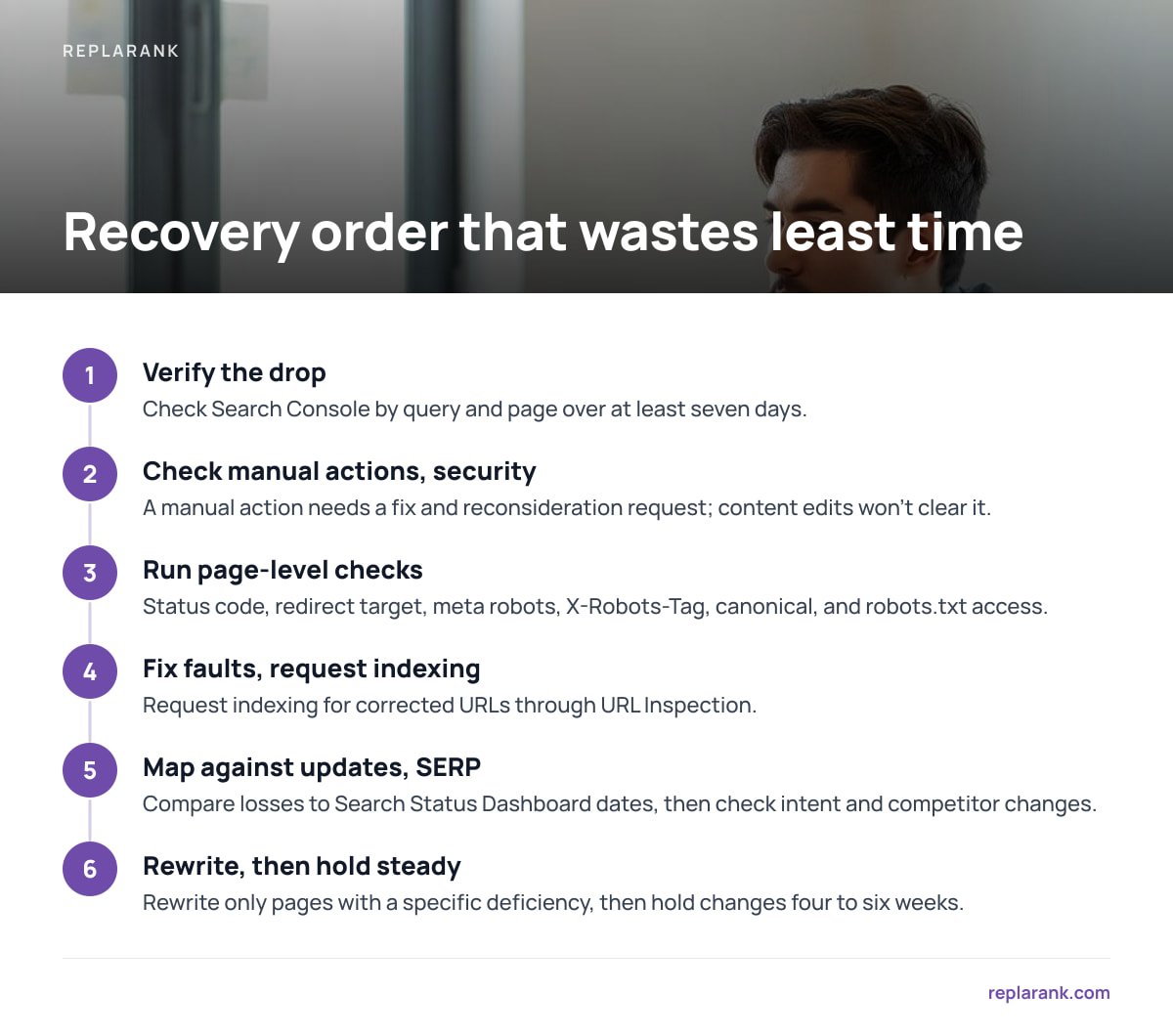
Work in this sequence. Each step is cheaper and faster than the one after it, and each can make the later steps unnecessary.
- Verify the drop in Search Console by query and page over at least seven days.
- Check the Manual actions and Security issues reports. A manual action under Google's spam policies requires a fix and a reconsideration request. No content edit will clear it on its own.
- Run page-level checks on every losing URL: status code, redirect target, meta robots, X-Robots-Tag, canonical, and robots.txt access.
- Fix technical faults and request indexing for the corrected URLs through URL Inspection.
- Map losses against update dates on the Search Status Dashboard.
- Compare against the current SERP for intent and competitor changes.
- Rewrite or consolidate only the pages where you identified a specific deficiency.
- Hold changes steady for four to six weeks and measure. Stacking edits weekly makes it impossible to know which one worked.
Fix in order of reversibility: a noindex removal recovers in days, a consolidation in weeks, a quality reassessment in months.
Track Recovery Without Burning Your Data Budget
Recovery plays out over weeks, so your tracking cadence should match. Daily rank checks during a six-week recovery give you 42 noisy data points where six weekly ones would tell the same story.
Cadence also decides cost, especially if you pay per check. At roughly 1.6 cents per fresh check on pay-as-you-go search data:
| Keywords | Weekly checks (≈4.3/month) | Daily checks (≈30/month) |
|---|---|---|
| 100 | ≈ $7/month | ≈ $48/month |
| 500 | ≈ $35/month | ≈ $240/month |
| 1,000 | ≈ $69/month | ≈ $480/month |
To be plain about it: at 500 keywords checked daily, pay-per-check data costs about $240 a month, several times more than an entry-level rank-tracking subscription at around $49. Per-check pricing wins on weekly cadences, small keyword sets, and large numbers of sites or users. The setup details are covered in our DataForSEO setup guide, and the broader ownership math in self-hosted vs cloud SEO tools.
A sensible split is to check the 20–50 keywords you're actively recovering every few days and leave the rest on weekly checks.
See Why a Keyword Dropped Next to the Drop Itself
The slowest part of recovery is the gap between seeing a position fall and finding out why. ReplaRank closes that gap. It runs page-health checks for 404s, redirects, noindex and canonical issues on desktop, mobile or both, next to position history across 35 countries. It also syncs Search Console daily by query and date and keeps that history past Google's 16-month limit, so next year's drop has a baseline. It's a one-time $399 purchase that you self-host, with search data paid to DataForSEO at cost.
The caveat: if you check hundreds of keywords daily, the per-check data bill will exceed a typical subscription. At 500 keywords a day, that is about $240 a month. ReplaRank makes financial sense on weekly cadences, smaller keyword sets, or many sites and users. Run your own numbers before you buy.
Frequently Asked Questions
How long does it take to recover lost keyword rankings?
It depends on the cause. Technical fixes such as removing a stray noindex or restoring a 404 can recover within days to a couple of weeks of Google recrawling the page. Losses tied to a core update can take months, and Google says some sites don't recover until a later core update.
Should I rewrite content immediately after a ranking drop?
No. First confirm the drop in Search Console and rule out technical faults such as 404s, redirects, noindex tags and canonical errors. Rewrite only when you can name a specific way your page is worse than the page now outranking it.
How do I know if a ranking drop was caused by a Google update?
Compare the date of your drop against rollout dates on the Google Search Status Dashboard, and check whether the loss is spread across many pages rather than concentrated on one URL. Wait until the update is marked complete before you compare before-and-after data.
Can a manual action cause lost rankings, and how do I fix it?
Yes. Check the Manual actions report in Search Console. It names the issue and the affected pages. Fix the violation described under Google's spam policies, then submit a reconsideration request, because editing content alone won't lift the action.
How often should I check rankings during a recovery?
Weekly is enough for most keywords, because recovery unfolds over weeks and daily data mostly adds noise. Check the small set of keywords you're actively working on every few days if you need faster feedback.
Sources
- Debugging drops in Google Search traffic | Google Search Central
- Google Search's core updates and your website | Google Search Central
- Page indexing report | Google Search Console Help
- Redirects and Google Search | Google Search Central
- Spam policies for Google web search | Google Search Central