

A tool to detect 404 errors and redirects should report three things for every URL: the final status code, every hop in the redirect chain, and whether that page still ranks for anything. Most site crawlers handle the first two well. What separates tools is whether they check the URLs Google actually ranks, from the device Google actually crawls with. A broken page nobody searches for is housekeeping. A broken page holding a top-five ranking is an emergency.
TL;DR:
- A useful 404 and redirect checker reports the final status, every redirect hop, and the device it tested from. A single "OK" or "broken" label is not enough.
- Site crawlers find every broken link. Search Console shows what Google saw, but it reports on Google's crawl schedule. Neither one tells you which broken URL is costing you rankings.
- Redirect chains, loops, soft 404s and mobile-only redirects are the errors most basic checkers miss.
- Per-check tools are cheap for weekly checks or small keyword sets. A flat subscription is cheaper if you check hundreds of keywords every day.
- For most SEOs, the best setup is a crawler for site-wide cleanup plus page checks tied to ranking URLs, so you fix what matters first.
Table of Contents
- What a 404 and Redirect Checker Must Report, Not Just Flag
- Five Kinds of Tool to Detect 404 Errors and Redirects, Compared
- Why Search Console Alone Finds Problems Too Late
- Redirect Chains, Loops and Soft 404s: The Errors Basic Checkers Miss
- Desktop vs. Mobile: The Redirect Your Checker Never Sees
- What These Tools Cost, and Where a Subscription Wins
- Which Tool to Use, by Situation
- Catch the 404 on Your Ranking Page Before the Ranking Is Gone
- Frequently Asked Questions
- Sources
What a 404 and Redirect Checker Must Report, Not Just Flag
A tool that labels a URL "broken" or "OK" is not doing enough. The status codes themselves are defined in RFC 9110, the IETF's HTTP Semantics standard. Each code tells you something different about what to fix.
- 301 and 308 are permanent. These redirects tell search engines that the old URL is gone and the new one should take its place. RFC 9110 specifies that 308 keeps the original request method, while a 301 may change a POST into a GET.
- 302 and 307 are temporary. Leave one in place for months and you are sending Google a mixed signal. You are telling it to keep the old URL, while every visitor actually lands somewhere else.
- 404 and 410 both mean the page isn't there. A 404 means not found. A 410 means deliberately gone. For indexing purposes, Google handles them almost the same way.
- 200 on an empty page is still a problem. A page that returns "200 OK" but displays "product not found" is a soft 404. Status-code-only checkers report it as healthy.
At minimum, a worthwhile checker records five things for each URL:
- The starting status
- Each redirect hop
- The final URL and its status
- The user agent it tested with
- Any
noindexor canonical tag on the destination
A 301 that ends on a page tagged noindex is functionally a 404 for search. Only a tool that reads the destination page will catch it.
Five Kinds of Tool to Detect 404 Errors and Redirects, Compared
No single tool type covers everything. Here is how the five main categories compare on the questions that matter.
| Tool type | Finds broken internal links | Shows what Google saw | Ties errors to rankings | Catches mobile-only redirects | Typical cost model |
|---|---|---|---|---|---|
| Desktop or cloud site crawler | Yes, site-wide | No | No | Only if configured | License or subscription |
| Google Search Console | Partially | Yes | Indirectly, via clicks | Yes (mobile-first crawl) | Free |
| Server log analysis | No | Yes, every Googlebot hit | No | Yes | Setup time, storage |
| Uptime and status monitor | No | No | No | Rarely | Monthly per check |
| Rank tracker with page checks | No | No | Yes, per ranking URL | Yes, if it checks mobile | Per check or subscription |
The crawler is the workhorse for cleanup. Run one before a migration and once a quarter afterward. Search Console is free and authoritative, but it lags behind your site. Log analysis is the most accurate source available, and the most work to set up. Uptime monitors only answer "is the homepage up?"
The rank tracker with page checks covers the gap the others leave. It tells you that the URL ranking third for your money keyword now returns a 404. A crawler will report that same 404 as one line among 4,000 others.
A crawler tells you what is broken. Only a ranking-aware check tells you which broken thing is costing you traffic this week.
Why Search Console Alone Finds Problems Too Late
Google's Page indexing report in Search Console lists URLs Google tried to crawl and could not index. It includes buckets for "Not found (404)," "Page with redirect," "Soft 404" and "Redirect error." It is the closest thing you have to Google's own verdict. Use it.
The limitation is timing. The report updates when Google recrawls, not when you deploy. If a release breaks a template on Tuesday, you may not see the damage until Googlebot has revisited enough affected URLs to show up in the report. By then, rankings may have already moved. If you are trying to explain a drop after the fact, the sequence of events matters. We cover that in diagnosing 404s and redirects hurting your rankings.
Search Console also keeps only 16 months of performance data. If a page lost its rankings 18 months ago, Google's interface can no longer show you what it used to earn. Archive the data yourself if you want that history.
Redirect Chains, Loops and Soft 404s: The Errors Basic Checkers Miss
Several kinds of errors pass straight through a basic checker.
Redirect chains
Each hop adds latency. Each hop is also one more place where a later edit can break the path. Google's documentation on HTTP status codes and network errors sets a hard limit on how many hops it will follow.
Google Search follows up to 10 redirect hops. Past that, Search Console reports a redirect error and the content is not fetched.
Ten sounds generous until you stack the layers. A typical chain might run through an HTTP-to-HTTPS rule, a www rule, a trailing-slash rule, an old CMS slug, and a migration map. That is five hops before anyone has made a mistake. Aim for one hop.
Redirect loops
In a loop, A redirects to B and B redirects back to A. Browsers show an error. Some lightweight checkers stop at the first 3xx and report "redirect: fine." Your tool needs to follow the whole chain to the end.
Soft 404s
Google's same documentation describes soft 404s: pages that return 200 but are effectively empty or display an error message. A typical example is an e-commerce category with zero products. Only tools that inspect page content, or Search Console itself, will flag them.
Redirects to irrelevant pages
Google's guidance on redirects recommends server-side permanent redirects for moved content. Redirecting hundreds of dead product URLs to the homepage is a common shortcut. Google may treat that pattern as a soft 404 anyway. Redirect each URL to the closest equivalent page, or let it return 404.
Pro Tip: Check whether your tool sends HEAD or GET requests. Many fast checkers use HEAD to save bandwidth. However, some servers, CDNs and application frameworks return a different status to HEAD than to GET. A common case is a 405 or a 200 where the real page would return a 301. If a checker's results disagree with your browser, retest the same URL with GET before you trust either one.
Desktop vs. Mobile: The Redirect Your Checker Never Sees

Google indexes with a smartphone crawler for most sites. Many redirect rules depend on the user agent: separate mobile subdomains, app-install interstitials, geo-redirects, and CDN rules that serve different responses to different devices.
A checker that only requests pages with a desktop user agent can report a clean 200 while mobile visitors, and Googlebot Smartphone, are sent somewhere else entirely.
For any URL that matters, test it both ways and compare:
- Final URL. Both devices should land on the same canonical destination.
- Final status. A 200 on desktop next to a 404 on mobile usually points to a broken mobile template or rule.
- Hop count. Mobile chains are often longer because of extra device-detection rules.
- Meta robots. A mobile template that carries
noindexwill quietly remove pages from Google's mobile-first index.
If your checker cannot switch user agents, it is checking a version of your site that Google mostly ignores.
What These Tools Cost, and Where a Subscription Wins

Pricing models differ more than features do, so do the arithmetic before you buy.
Crawlers are usually priced by license or by crawl volume. Check-based tools, including rank trackers that pull live search data, are usually priced per request.
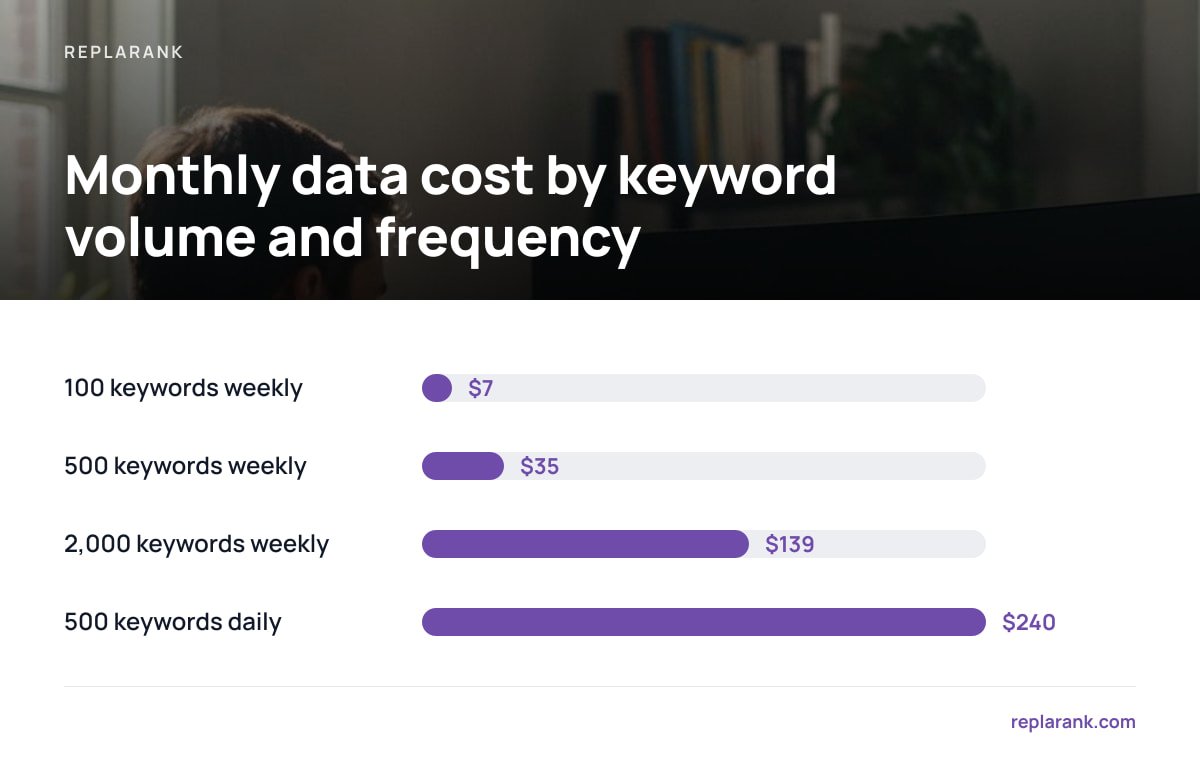
Take a self-hosted setup where you pay the data provider directly. There, a fresh rank check costs roughly 1.6 cents. That makes the cost easy to calculate:
| Keywords | Frequency | Approx. checks per month | Approx. data cost per month |
|---|---|---|---|
| 100 | Weekly | 433 | $7 |
| 500 | Weekly | 2,165 | $35 |
| 500 | Daily | 15,000 | $240 |
| 2,000 | Weekly | 8,660 | $139 |
Read the third row carefully. If you check 500 keywords every day, a $49-a-month entry subscription is clearly cheaper. Paying per check only comes out ahead on weekly schedules, smaller keyword sets, or when you need unlimited sites and users without per-seat fees.
We break down the full trade-off in rank tracking tools and the cost nobody explains and in self-hosted vs. SaaS rank trackers.
Which Tool to Use, by Situation

The right choice depends on what you are trying to do.
- Pre-migration or quarterly audit. Use a site crawler. Nothing else maps every internal link and redirect rule.
- Explaining a sudden traffic drop. Start with Search Console's Page indexing report, then check the specific ranking URLs that lost positions. Our guide to the real causes of a sudden ranking drop puts broken URLs in context with the other likely causes.
- Ongoing monitoring of pages that earn money. Use page checks tied to your tracked keywords, on mobile and desktop. This catches a broken ranking page within one check cycle instead of one crawl cycle.
- Large sites with crawl budget concerns. Add log analysis. It is the only way to see how often Googlebot hits your 404s.
Our recommendation for most practitioners is a crawler for periodic cleanup plus ranking-aware page checks for everything in between. Search Console sits underneath both as the free source of truth. Skip uptime monitors for this job. They answer a different question.
Catch the 404 on Your Ranking Page Before the Ranking Is Gone
ReplaRank checks the URLs your keywords actually rank with. It reports 404s, redirects, noindex and canonical issues on desktop, mobile or both, right next to each keyword's position history. It syncs Search Console data daily and keeps it past Google's 16-month limit, so you can see what a broken page used to earn in real clicks. It's a one-time $399 purchase. You run it on your own server, with unlimited sites and users, and you pay DataForSEO directly at cost.
The caveat is the math from the table above. At roughly 1.6 cents per fresh check, tracking hundreds of keywords daily will cost more than a subscription. ReplaRank pays off on weekly schedules, smaller keyword sets, and for agencies tired of per-seat pricing. It is also not a full site crawler, so keep one for migrations.
Frequently Asked Questions
What is the best free tool to detect 404 errors and redirects?
Google Search Console is the best free option because it shows the 404s, soft 404s and redirect errors Google itself ran into. It updates when Google recrawls your pages, not when you make changes, so expect a delay. Pair it with a crawler for site-wide coverage.
Is a 404 error bad for SEO?
A 404 on a page that never ranked or earned links is normal and harmless. A 404 on a page that held rankings or backlinks is costly, because Google drops the URL from its index and its signals stop counting. Priority depends on what the page was earning, not on the error itself.
How many redirects in a chain is too many?
Google follows up to 10 redirect hops before reporting a redirect error, according to its Search Central documentation. In practice, aim for a single hop, because every extra hop adds latency and another point of failure. Collapse chains so that old URLs point directly at the final destination.
Should I use a 301 or a 302 redirect?
Use a 301 or 308 when content has moved permanently, and a 302 or 307 only when the move is genuinely temporary. Leaving a 302 in place for months sends a conflicting signal about which URL should be indexed. A 308 also guarantees the request method is preserved, which matters for forms and APIs.
Why does my checker show a 200 when Google reports a 404?
The most common causes are a soft 404, where the page loads but shows no real content, or a redirect that only triggers for mobile user agents. Some checkers also send HEAD requests that servers answer differently than GET requests. Retest with a smartphone user agent and a GET request.
Sources
- RFC 9110: HTTP Semantics | IETF / RFC Editor
- How HTTP status codes, and network and DNS errors affect Google Search | Google Search Central
- Redirects and Google Search | Google Search Central
- Page indexing report | Google Search Console Help