
Tracking software is not one category, and the best pick depends on what you are tracking: employee hours, computer activity, physical tools, or keyword rankings. For people, choose the least invasive tool that answers your actual question, usually a time tracker used with notice and consent. For keyword positions, choose a rank tracker and decide your check frequency first, because that sets your cost more than the brand does.
TL;DR:
- "Tracking software" covers time tracking, employee monitoring, tool tracking, rank tracking, and personal tracking. Buy on the question you need answered, not the category label.
- For employees, a timer-based time tracker with written notice beats screenshot and keystroke monitoring on trust, legal exposure, and usefulness.
- Free tiers work for one person or a small team. They break on seat caps, history limits, and reporting.
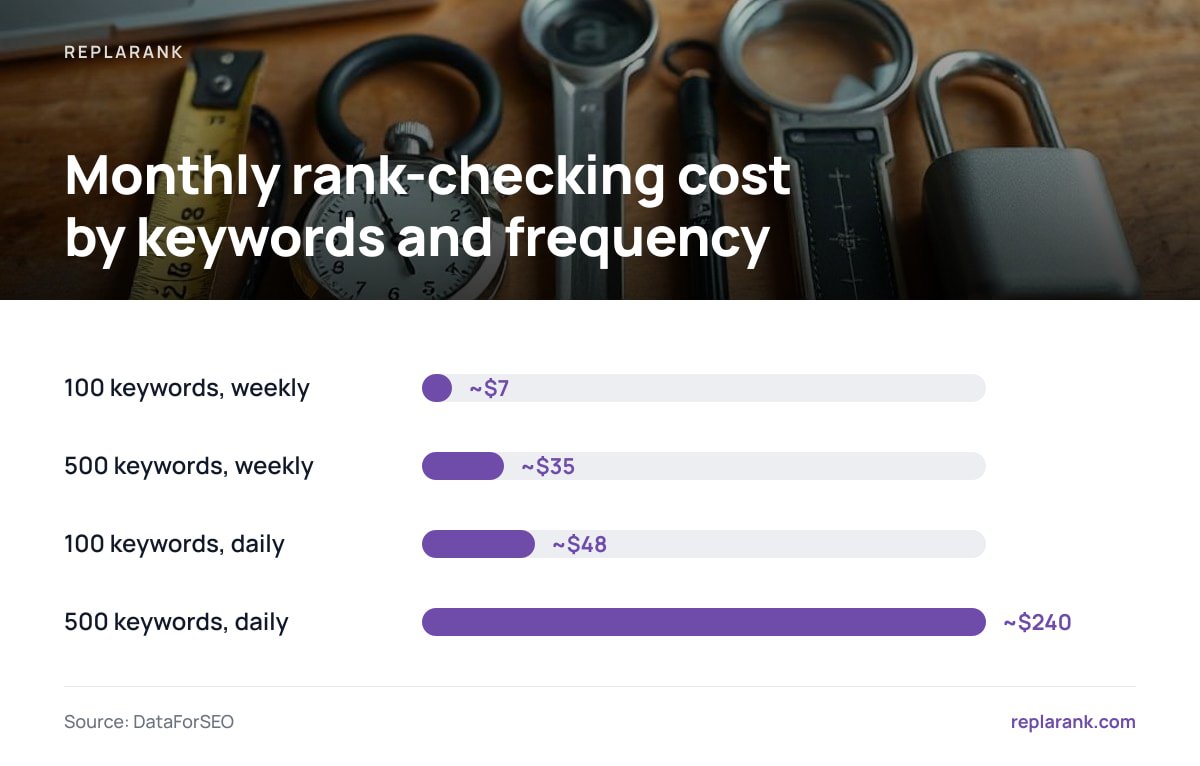
- For keyword rankings, cost is driven by check frequency: about $7 a month for 100 keywords weekly, about $240 for 500 keywords daily at 1.6 cents per check.
- For multi-client rank tracking, require isolated client data and per-client spend limits. A subscription is cheaper at daily volume; owning wins on weekly checks and unlimited sites.
Table of Contents
- Tracking Software Is Five Products Sharing One Name
- How to Monitor Employee Activity on Your Computer Without Creating a Legal Problem
- Best Free Tracking App: What Free Tiers Cover and Where They Stop
- What Is the Best Tool Tracking Software? It Depends on Which Tools
- Best Tracking Software for Keyword Rankings: Pay Per Check or Pay Monthly
- Multi-Country and Multi-Client Tracking Software: What to Verify Before You Buy
- Track Rankings for Every Client With a One-Time $399 Tool
- Frequently Asked Questions
- Sources
Tracking Software Is Five Products Sharing One Name

Search "tracking software" and the results skew toward employee monitors and time trackers. But the same two words also describe tools that follow physical equipment, keyword positions in Google, and your own habits. They share a label and almost nothing else.
Here is how the categories split, and where free actually works:
| Category | What it tracks | Free option worth using | Where free breaks |
|---|---|---|---|
| Time tracking | Hours by project or task | Free tiers for individuals and small teams | Seat caps, limited reports, short history |
| Employee monitoring | App and website activity, sometimes screenshots | Rarely free beyond a trial | Legal and trust cost, not license cost |
| Tool and asset tracking | Physical tools and equipment | A spreadsheet plus QR or barcode labels | No audit trail once you pass a few dozen items |
| Rank tracking | Keyword positions in search results | Google Search Console | Averaged positions, 16 months of history, no competitor view |
| Personal tracking | Habits, spending, fitness | Built-in phone apps or a spreadsheet | Nothing you should pay for |
My position: buy on the question, not the category. "How many hours did we bill?" is a time-tracking question. "Is anyone leaking files?" is a security question and needs different tooling. "Where do we rank in Germany on mobile?" is a rank-tracking question. Most failed purchases come from a tool answering a question nobody asked.
How to Monitor Employee Activity on Your Computer Without Creating a Legal Problem
If you manage people, start with the lowest-intrusion data that answers your question. Here is the order I would work in:
- Name the question. Billing accuracy, project profitability, security, and "are people working?" need four different data sets. The last one is usually a management problem, not a software one.
- Start with timers and project time. Self-reported or timer-based tracking gives you hours per project without recording what is on anyone's screen.
- Add app and website category logs only if you need them. Category-level data (browser, design tool, email) tells you about workload without capturing content.
- Skip keystroke logging and constant screenshots. They capture passwords, personal messages, and medical searches, and you then own that data.
- Give written notice before you start. This is a legal requirement in places. New York's Civil Rights Law section 52-c requires employers who monitor phone, email, or internet use to give written notice at hiring and obtain an acknowledgment. The UK regulator's guidance on monitoring workers expects monitoring to be necessary, proportionate, and transparent to the people monitored.
- Set retention and access limits. Decide who sees the data and when it is deleted before the first report is generated.
Monitoring that you cannot explain to the monitored employee in two sentences is monitoring you should not run.
Pro Tip: Write your monitoring policy as a list of what you do not collect, such as no keystrokes, no webcam, no personal browsing content, alongside what you do. It shortens the employee conversation, and it forces you to confirm the tool can actually be configured that way before you sign.
Best Free Tracking App: What Free Tiers Cover and Where They Stop
The best free tracking app is the one whose limit you will not hit. Free time-tracking tiers generally suit freelancers and small teams. The usual limits are on users, report depth, and how far back you can export.
Check three things before you commit to a free plan:
- Seat cap. If the free tier covers one user and you hire in six months, you are migrating data under pressure.
- Export. If you cannot export every entry to CSV, the "free" plan is a lock-in.
- Reporting. Billable-versus-non-billable splits and per-project totals are often the first paid features. Confirm you can get them without paying.
For personal tracking, such as habits, spending, or workouts, I would not install anything new. Your phone's built-in activity and health tools plus a spreadsheet cover almost every case, and none of them sell your data.
For free rank tracking, use Google Search Console. It gives you real impressions and clicks, but its position figure is an average across every impression, not a fixed check from one location. It also only shows 16 months of performance data. That makes it a good trend signal and a poor tool for answering "where do I rank in Toronto on mobile today?"
What Is the Best Tool Tracking Software? It Depends on Which Tools
If "tool tracking" means physical equipment such as drills, meters, or laptops, the choice comes down to what failure you are preventing.
- Lost-in-the-building problem. You need location. Bluetooth or GPS tags earn their cost on high-value items that move between sites.
- Nobody-owns-it problem. You need checkout accountability. Barcode or QR labels with a check-out and check-in log solve this for far less money than tags.
- Calibration and maintenance problem. You need service schedules attached to each asset, not location data at all.
My pick for most small crews is the cheapest one: labels, a scanner or phone camera, and a check-out log. Add location hardware only when a specific item keeps disappearing in transit. Paying for live tracking on a $20 wrench is a bad trade.
Best Tracking Software for Keyword Rankings: Pay Per Check or Pay Monthly

Rank tracking is where the pricing model matters most, and where the obvious answer is often wrong. A monthly subscription gets you a fixed keyword allowance. A self-hosted tracker charges you per fresh check at the data provider's rate, which is about 1.6 cents per check through DataForSEO. If you want the underlying per-call math, this comparison of search-data API costs walks through it.
Here is what that looks like in a month:
| Keywords | Frequency | Checks per month | Approx. cost at 1.6¢ |
|---|---|---|---|
| 100 | Weekly | ~430 | ~$7 |
| 500 | Weekly | ~2,160 | ~$35 |
| 100 | Daily | 3,000 | ~$48 |
| 500 | Daily | 15,000 | ~$240 |
500 keywords checked daily at 1.6 cents each comes to about $240 a month, almost five times a $49 entry-level subscription.
Pay-per-check is not cheaper at volume. A subscription wins when you check many keywords every day. Pay-per-check wins when you check weekly, track a small set, or run many sites and users, since there are no seat or project caps. For a deeper look at what hosted trackers charge and when owning makes sense, see this breakdown of hosted rank tracker pricing.
If daily checks matter, though, there is a cheaper route than checking everything daily. Track the full set weekly, and use daily Search Console data to flag the keywords that actually moved. Then spend fresh checks only on those.
Pro Tip: Treat a click drop in Search Console as the trigger for a fresh rank check, not the calendar. A page whose clicks fall 30 percent overnight deserves a check today. A page that has been flat for six weeks does not need one tomorrow. This usually cuts daily-check costs by a large margin without losing the alert.
Multi-Country and Multi-Client Tracking Software: What to Verify Before You Buy

Agencies and consultants have different requirements from in-house teams. Check these before you commit:
- Client isolation. Each client's keywords, history, and spend should be separate. Shared pools make it easy to leak one client's data into another's report.
- Spend limits per client. With pay-per-check, a runaway keyword list on one account should not eat the whole month's budget.
- Real country and device coverage. A tool that tracks "the US" on desktop only will mislead you when most of the client's traffic is mobile in four other countries. Ask for the exact country list and whether mobile is a separate check.
- Share links without logins. Clients rarely create accounts. A read-only link they can open, which should carry a noindex directive so it never shows up in search, is more practical than seat licenses.
- History you own. Search Console only keeps 16 months. If your tool syncs daily and keeps the data longer, year-over-year comparisons survive.
- CSV export. If you cannot get your data out, you do not own your reporting.
When a client's rankings fall, positions alone will not tell you why. You also need page-level checks for 404s, redirects, noindex tags, and canonical problems. This guide to recovering lost keyword rankings covers the diagnosis order, and this explainer on reading SEO rankings covers what the numbers do and do not mean.
Track Rankings for Every Client With a One-Time $399 Tool
ReplaRank is a self-hosted rank tracker. You pay $399 once, run it on your own server, and pay DataForSEO directly for each check. It covers mobile tracking across 35 countries and page-health checks (404s, redirects, noindex, canonical issues) on desktop, mobile, or both. It syncs Google Search Console daily and keeps that history past Google's 16 months. Each brand is isolated with its own spend limit, there are unlimited sites and users, and you can export everything to CSV or share a login-free, noindex link.
Here is the limit: daily checking at volume costs more than a subscription. At roughly 1.6 cents per fresh check, 500 keywords daily is about $240 a month, against $49 for an entry-level plan. ReplaRank makes sense if you check weekly, track modest keyword sets, or run many sites and clients and want to own the tool rather than rent seats. If you need heavy daily volume, do the math first.
Frequently Asked Questions
What is the best software for tracking?
It depends on what you are tracking. Use a timer-based time tracker for hours, a labeled check-out log for physical tools, Search Console plus a rank tracker for keyword positions, and a spreadsheet for personal habits. Pick by the question you need answered, not by category.
Which is the best free tracking app?
The best free app is the one whose limits you will not hit. For time tracking, check seat caps, CSV export, and per-project reports before committing. For rankings, Google Search Console is free and gives real clicks, but its positions are averages and history stops at 16 months.
How can I monitor employee activity on my computer?
Start with timer-based project tracking, add app or website category logs only if you need them, and skip keystroke logging. Give written notice first, since places like New York require it, and the UK regulator expects monitoring to be necessary and proportionate. Set retention and access limits before you begin.
What is the best tool tracking software?
For physical tools, barcode or QR labels with a check-out and check-in log solve most small-crew problems cheaply. Add Bluetooth or GPS tags only for high-value items that keep going missing between sites.
Is a one-time-purchase rank tracker cheaper than a subscription?
Only at certain volumes. Checking 100 keywords weekly costs about $7 a month in search-data fees, but 500 keywords daily costs about $240, well above a $49 entry-level subscription. Unlimited sites and users and owning the tool are the other reasons to choose it.
Sources
- Monitoring workers | Information Commissioner's Office (UK)
- New York Civil Rights Law section 52-c, electronic monitoring | New York State Senate
- Performance report (Search Console) | Google Search Console Help
- SERP API | DataForSEO